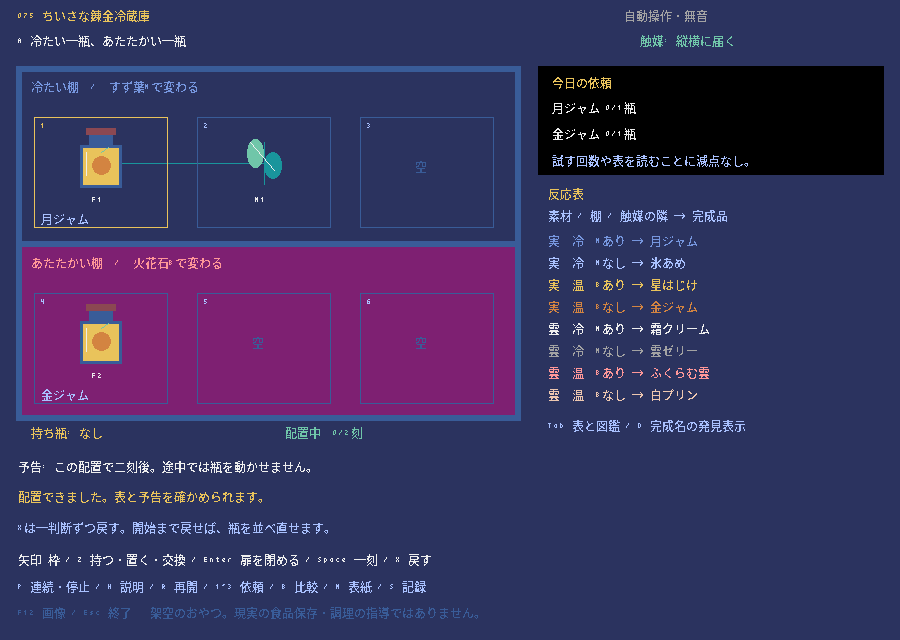
完成サンプルをブラウザーで遊ぶ
この講座のもとになった完成版のゲームを、ブラウザーでそのまま遊べます。キーボードで操作するので、PCで開いてください(スマホのタッチ操作には対応していません)。初めて開くときは、読み込みに少し時間がかかります。
完成版の主な操作:矢印キーで枠を動かす、Zで持つ・置く・入れ替える、Enterで試運転、Spaceで1刻進める、Pで自動運転・停止、Xで1手戻す
ボタンを押すと、ゲームの読み込みが始まります。
画面に「CLICK TO START」と出たらクリックします。続けてゲーム画面を一度クリックすると、キー操作が効くようになります。ゲームを終えるときは、枠の外にある「閉じる」ボタンを使ってください(Escキーの働きはゲームごとに違います)。ゲーム内のセーブは、閉じる・ページを移る・再読み込みすると消えます。
うまく表示されないとき
ゲームを動かすためのプログラム(Pyxel 2.9.9)は、外部の配信サービス(jsDelivr)から読み込みます。表示されないときは「最初から再読込」を押すか、完成版のソースをダウンロードしてPCで実行してください。ブラウザー版の録画機能は止めています。ブラウザー版で確認できている範囲は検証状況にまとめています。
となりにあるものから、結果を決める。
いきなり完成版のコードを全部読む必要はありません。小さなゲームにルールを1つずつ足しながら、5つのステップで作っていきます。どのステップのファイルもそれだけで動くので、動きを確かめてから次へ進みましょう。
- 必要な環境
- Python 3.11以上 / Pyxel 2.9.9
- 知っておくとよいこと
- 変数・if・関数の基本
- 教材に入っているもの
- ステップごとに動くPythonファイル5本・説明・動作確認用のテスト
- 完成した教材の操作
- 矢印:枠を動かす / Z:持つ・置く・入れ替える / Enter:運転開始 / Space:1刻進める / X:1手戻す(05) / R:最初に戻す
- 難易度の目安
- 入門このページで使うプログラムの考え方の数と難しさから決めた目安です。難易度について
- 学習順に迷ったら
- おすすめの学ぶ順番を見る
コードを書き換えたら、ファイルを保存し、動いているゲームを閉じてから、もう一度同じ.pyを実行します。ゲーム中にRキーなどで「やり直し」をしても、書き換えたコードは読み込まれません。
教材のゲーム画面は、日本語フォントを用意しなくても動くように英語で表示しています。ファイルには動作確認用のコードも入っていますが、最初は Game / State・update・draw の3つに注目すれば十分です。わからない言葉は用語集で調べられます。class・self・dataclass はPythonの状態、キー入力と時間の扱いは入力・更新・描画、マス目とピクセルの違いは画面とマップの座標のページで詳しく説明しています。
六枠と一つの手
データを入れ替えて、持つ・置く・交換するを作る。
元のゲームの A にある F1、F2、M1 の瓶を、6つの枠を持つ tuple に入れます。空の枠は空の文字列、手に持っている瓶は hand です。選んだ枠と手の中身を「同時代入」で入れ替えると、持つ・置く・交換するの3つの操作を1つの式で書けます。State は書き換えられないようにして(凍結)、replace で新しい状態を作ります。この段階には、棚の温度・反応・運転開始・時間の進行はまだありません。
下のコードは 01_hand.py の一部です。前のステップから追加・変更したところだけを抜き出しています。
slots[index], hand = state.hand, slots[index]実行して確かめる
教材のZIPを展開したフォルダーで、次のコマンドを実行します。
.venv\Scripts\python.exe 01_hand.py.venv/bin/python 01_hand.py- 持つ・置く・入れ替えるができる
- F1 と F2 を区別できる
- R キーで手も棚も元に戻る
slots[index] に手の瓶を入れてから、その枠を hand にコピーすると、元の瓶がなくなってしまいます。右側を先に計算してから代入する「同時代入」を使います。F1 を持ち、M1 の枠で入れ替えて、空いている枠に M1 を置いてみましょう。棚と手を合わせた瓶の ID の集まりが、最初と同じになっているか説明してみましょう。
このステップのコード全文(222行)
# MIT License
#
# Copyright (c) 2026
#
# Permission is hereby granted, free of charge, to any person obtaining a copy
# of this software and associated documentation files (the "Software"), to deal
# in the Software without restriction, including without limitation the rights
# to use, copy, modify, merge, publish, distribute, sublicense, and/or sell
# copies of the Software, and to permit persons to whom the Software is
# furnished to do so, subject to the following conditions:
#
# The above copyright notice and this permission notice shall be included in all
# copies or substantial portions of the Software.
#
# THE SOFTWARE IS PROVIDED "AS IS", WITHOUT WARRANTY OF ANY KIND, EXPRESS OR
# IMPLIED, INCLUDING BUT NOT LIMITED TO THE WARRANTIES OF MERCHANTABILITY,
# FITNESS FOR A PARTICULAR PURPOSE AND NONINFRINGEMENT. IN NO EVENT SHALL THE
# AUTHORS OR COPYRIGHT HOLDERS BE LIABLE FOR ANY CLAIM, DAMAGES OR OTHER
# LIABILITY, WHETHER IN AN ACTION OF CONTRACT, TORT OR OTHERWISE, ARISING FROM,
# OUT OF OR IN CONNECTION WITH THE SOFTWARE OR THE USE OR OTHER DEALINGS IN THE
# SOFTWARE.
#
# Third-party exception: bitmap glyph data derived from Noto Sans CJK is licensed
# under the SIL Open Font License 1.1. See assets/NOTO-LICENSE.txt.
# This teaching edition uses ASCII only; no Noto glyph data is bundled.
# Pyxel is an external dependency under its own MIT license.

"""075 ちいさな錬金冷蔵庫・教材 1/5: 持つ・置く・交換する。
架空の反応パズルであり、現実の食品保存・化学の安全指導ではありません。
各ファイルは単独で実行できます。
"""
from dataclasses import dataclass, replace

# 原作Aの瓶IDを保持。同じ種類でもF1とF2は別の瓶です。
INITIAL_SLOTS = ("F1", "", "", "F2", "M1", "")
PRODUCTS = ("MOON JAM", "ICE CANDY", "STAR POP", "GOLD JAM",
            "FROST CREAM", "CLOUD JELLY", "PUFF CLOUD", "WHITE PUDDING")
COLORS = (12, 6, 10, 9, 7, 13, 14, 15)


@dataclass(frozen=True)
class State:
    slots: tuple = INITIAL_SLOTS
    hand: str = ""
    t: int = 0
    status: str = "edit"
    products: tuple = (-1,) * 6


def initial():
    return State()


def validate(state):
    """瓶のIDは棚か手のどちらかに必ず一つだけ存在します。"""
    actual = sorted(token for token in state.slots + (state.hand,) if token)
    expected = sorted(token for token in INITIAL_SLOTS if token)
    assert actual == expected
    assert len(state.slots) == len(state.products) == 6
    assert 0 <= state.t <= 2
    return True


def act(state, action):
    if action.startswith("pick:") and state.status == "edit":
        index = int(action.split(":")[1])
        if not 0 <= index < 6:
            return state
        slots = list(state.slots)
        # 空の手→持つ、空枠→置く、瓶入りの枠→交換、を同じ式で表します。
        slots[index], hand = state.hand, slots[index]
        return replace(state, slots=tuple(slots), hand=hand)
    return state


KEYS = {"LEFT", "RIGHT", "UP", "DOWN", "Z", "RETURN", "SPACE", "X", "R"}


class Controller:
    def __init__(self):
        self.previous = set()
        self.gate = False
        self.reset()

    def reset(self):
        self.state = initial()
        self.cursor = 0
        self.history = []
        self.notice = "Move M1 from slot 5 to slot 2."

    def commit(self, action):
        new = act(self.state, action)
        if new == self.state:
            if action == "start" and self.state.hand:
                self.notice = "Put the held bottle down first."
            return False
        self.state = new
        validate(self.state)
        self.notice = "One action accepted."
        return True

    def feed(self, down):
        """押しっぱなし・同時押しで勝手に複数の操作をしないようにします。"""
        down = set(down) & KEYS
        fresh = down - self.previous
        self.previous = down
        if self.gate:
            if not down:
                self.gate = False
            return None
        if len(fresh) > 1:
            self.gate = True
            self.notice = "Release all keys, then press one."
            return "chord"
        if not fresh:
            return None
        key = next(iter(fresh))
        self.gate = True
        if key == "R":
            self.reset()
            return "reset"
        if self.state.status != "edit":
            return None
        if key in ("LEFT", "RIGHT"):
            delta = -1 if key == "LEFT" else 1
            self.cursor = (self.cursor // 3) * 3 + (self.cursor % 3 + delta) % 3
        elif key in ("UP", "DOWN"):
            self.cursor = (self.cursor + 3) % 6
        elif key == "Z":
            self.commit("pick:" + str(self.cursor))
        return key


# smoke用の短い入力。通常起動では自動操作はありません。
# 原作Aの解: 初期位置から下、右、Z、上、ZでM1を5番から2番へ。
DEMO_KEYS = ('DOWN', 'RIGHT', 'Z', 'UP', 'Z')


def main(headless=False, screenshot=None, smoke_scene="result"):
    import pyxel
    from pathlib import Path

    ui = Controller()
    rendered = 0
    keymap = {key: getattr(pyxel, "KEY_" + key) for key in KEYS}

    def update():
        # 12回の実draw後に保存。描画前の空バッファは保存しません。
        if headless and rendered >= 12:
            if screenshot:
                Path(screenshot).parent.mkdir(parents=True, exist_ok=True)
                pyxel.screenshot(screenshot, scale=2)
            pyxel.quit()
            return
        if headless:
            down = set()
            if smoke_scene == "result" and rendered < len(DEMO_KEYS):
                # テストでは各操作の前に全キーを離します。
                ui.feed(set())
                down = {DEMO_KEYS[rendered]}
        else:
            down = {key for key, code in keymap.items() if pyxel.btn(code)}
        ui.feed(down)

    def draw():
        nonlocal rendered
        s = ui.state
        pyxel.cls(1)
        pyxel.text(10, 8, "ALCHEMY FRIDGE / STEP 1", 10)
        pyxel.text(10, 20, "A HAND AND SIX SLOTS", 7)
        pyxel.text(10, 34, "CASE A: TWO FRUITS + ONE LEAF", 6)
        pyxel.rect(8, 48, 202, 158, 5)
        pyxel.rect(11, 51, 196, 72, 1)
        pyxel.rect(11, 128, 196, 75, 2)
        pyxel.text(16, 54, "TOP ROW", 12)
        pyxel.text(16, 132, "BOTTOM ROW", 14)
        for i, token in enumerate(s.slots):
            x, y = 17 + i % 3 * 63, 66 + i // 3 * 77
            pyxel.rectb(x, y, 57, 53, 10 if i == ui.cursor else 5)
            pyxel.text(x + 3, y + 3, str(i + 1), 6)
            product = s.products[i]
            color = COLORS[product] if product >= 0 else 10
            if token:
                if token[0] == "M":
                    pyxel.line(x + 27, y + 31, x + 27, y + 10, 3)
                    pyxel.elli(x + 15, y + 11, 14, 13, 11)
                    pyxel.elli(x + 28, y + 17, 13, 12, 3)
                else:
                    pyxel.rect(x + 22, y + 9, 15, 4, 4)
                    pyxel.rect(x + 19, y + 13, 21, 22, 5)
                    pyxel.rect(x + 21, y + 16, 17, 17, color)
                pyxel.text(x + 22, y + 38, token, 7)
            else:
                pyxel.text(x + 17, y + 25, "EMPTY", 5)
        pyxel.text(10, 214, "HAND: " + (s.hand or "EMPTY"), 10)
        pyxel.text(220, 50, "ONE SWAP EXPRESSION", 10)
        for row, text in enumerate(('One hand, six slots.', 'Z on a bottle: pick it up.', 'Z on EMPTY: put it down.', 'Z on another: swap.', '', 'Bottle IDs are preserved.', 'F1 and F2 are different.', '', 'No reactions in step 1.')):
            pyxel.text(220, 64 + row * 11, text, 7 if row % 2 == 0 else 6)
        pyxel.text(10, 230, ui.notice, 11)
        pyxel.text(10, 245, "ARROWS: SELECT  Z: PICK/PLACE/SWAP  R: RESET", 7)
        pyxel.text(10, 257, "ESC: QUIT  RELEASE KEYS BETWEEN ACTIONS", 6)
        pyxel.text(10, 276, "FICTIONAL PUZZLE. NOT FOOD OR CHEMISTRY ADVICE.", 5)
        rendered += 1

    pyxel.init(420, 290, title="Alchemy Fridge - Stage 1",
               fps=30, headless=headless)
    pyxel.run(update, draw)


if __name__ == "__main__":
    import argparse
    parser = argparse.ArgumentParser(description=__doc__)
    parser.add_argument("--headless-smoke", "--headless-smoke12frames",
                        action="store_true", dest="headless_smoke",
                        help="Render 12 frames and quit; not human playtesting")
    parser.add_argument("--screenshot", help="PNG path; use with --headless-smoke")
    parser.add_argument("--smoke-scene", choices=("initial", "result"), default="result",
                        help="Automatic QA scene only, not a gameplay feature")
    args = parser.parse_args()
    if args.screenshot and not args.headless_smoke:
        parser.error("--screenshot requires --headless-smoke")
main(args.headless_smoke, args.screenshot, args.smoke_scene)冷たい棚と温かい棚
材料と棚の組み合わせで、表から結果を引く。
0〜2番は冷たい棚、3〜5番は温かい棚です。ROW_TABLE は、(材料, 温かい棚か warm) の組み合わせから、できあがる完成品の番号を返す表です。まずは触媒を使わない反応だけを扱い、M はまだ無視します。predict は状態を変えずに、それぞれの枠の完成品の番号(NEXT P番号)を計算する予告です。C の材料の表もありますが、今回の A の配置には C の瓶はありません。
下のコードは 02_rows.py の一部です。前のステップから追加・変更したところだけを抜き出しています。
return ROW_TABLE[(token[0], warm)]実行して確かめる
教材のZIPを展開したフォルダーで、次のコマンドを実行します。
.venv\Scripts\python.exe 02_rows.py.venv/bin/python 02_rows.py- 上の段と下の段で、予告が変わる
- M の効果はまだない
- 予告では状態を変えない
index >= 3 で決めます。F を画面の3番と4番に交互に置いて、完成品の予告が変わる境目を確かめましょう。予告を見るだけでは完成しない理由も説明してみましょう。
このステップのコード全文(243行)
# MIT License
#
# Copyright (c) 2026
#
# Permission is hereby granted, free of charge, to any person obtaining a copy
# of this software and associated documentation files (the "Software"), to deal
# in the Software without restriction, including without limitation the rights
# to use, copy, modify, merge, publish, distribute, sublicense, and/or sell
# copies of the Software, and to permit persons to whom the Software is
# furnished to do so, subject to the following conditions:
#
# The above copyright notice and this permission notice shall be included in all
# copies or substantial portions of the Software.
#
# THE SOFTWARE IS PROVIDED "AS IS", WITHOUT WARRANTY OF ANY KIND, EXPRESS OR
# IMPLIED, INCLUDING BUT NOT LIMITED TO THE WARRANTIES OF MERCHANTABILITY,
# FITNESS FOR A PARTICULAR PURPOSE AND NONINFRINGEMENT. IN NO EVENT SHALL THE
# AUTHORS OR COPYRIGHT HOLDERS BE LIABLE FOR ANY CLAIM, DAMAGES OR OTHER
# LIABILITY, WHETHER IN AN ACTION OF CONTRACT, TORT OR OTHERWISE, ARISING FROM,
# OUT OF OR IN CONNECTION WITH THE SOFTWARE OR THE USE OR OTHER DEALINGS IN THE
# SOFTWARE.
#
# Third-party exception: bitmap glyph data derived from Noto Sans CJK is licensed
# under the SIL Open Font License 1.1. See assets/NOTO-LICENSE.txt.
# This teaching edition uses ASCII only; no Noto glyph data is bundled.
# Pyxel is an external dependency under its own MIT license.

"""075 ちいさな錬金冷蔵庫・教材 2/5: 冷たい棚と温かい棚。
架空の反応パズルであり、現実の食品保存・化学の安全指導ではありません。
各ファイルは単独で実行できます。
"""
from dataclasses import dataclass, replace

# 原作Aの瓶IDを保持。同じ種類でもF1とF2は別の瓶です。
INITIAL_SLOTS = ("F1", "", "", "F2", "M1", "")
PRODUCTS = ("MOON JAM", "ICE CANDY", "STAR POP", "GOLD JAM",
            "FROST CREAM", "CLOUD JELLY", "PUFF CLOUD", "WHITE PUDDING")
COLORS = (12, 6, 10, 9, 7, 13, 14, 15)


@dataclass(frozen=True)
class State:
    slots: tuple = INITIAL_SLOTS
    hand: str = ""
    t: int = 0
    status: str = "edit"
    products: tuple = (-1,) * 6


def initial():
    return State()


def validate(state):
    """瓶のIDは棚か手のどちらかに必ず一つだけ存在します。"""
    actual = sorted(token for token in state.slots + (state.hand,) if token)
    expected = sorted(token for token in INITIAL_SLOTS if token)
    assert actual == expected
    assert len(state.slots) == len(state.products) == 6
    assert 0 <= state.t <= 2
    return True


# 触媒は次段階。今は素材と棚だけで完成品の番号を引きます。
ROW_TABLE = {("F", False): 1, ("F", True): 3,
             ("C", False): 5, ("C", True): 7}


def reaction(slots, index):
    token = slots[index]
    if not token or token[0] not in "FC":
        return -1
    warm = index >= 3
    return ROW_TABLE[(token[0], warm)]


def predict(state):
    return tuple(reaction(state.slots, i) for i in range(6))


def act(state, action):
    if action.startswith("pick:") and state.status == "edit":
        index = int(action.split(":")[1])
        if not 0 <= index < 6:
            return state
        slots = list(state.slots)
        # 空の手→持つ、空枠→置く、瓶入りの枠→交換、を同じ式で表します。
        slots[index], hand = state.hand, slots[index]
        return replace(state, slots=tuple(slots), hand=hand)
    return state


KEYS = {"LEFT", "RIGHT", "UP", "DOWN", "Z", "RETURN", "SPACE", "X", "R"}


class Controller:
    def __init__(self):
        self.previous = set()
        self.gate = False
        self.reset()

    def reset(self):
        self.state = initial()
        self.cursor = 0
        self.history = []
        self.notice = "Move M1 from slot 5 to slot 2."

    def commit(self, action):
        new = act(self.state, action)
        if new == self.state:
            if action == "start" and self.state.hand:
                self.notice = "Put the held bottle down first."
            return False
        self.state = new
        validate(self.state)
        self.notice = "One action accepted."
        return True

    def feed(self, down):
        """押しっぱなし・同時押しで勝手に複数の操作をしないようにします。"""
        down = set(down) & KEYS
        fresh = down - self.previous
        self.previous = down
        if self.gate:
            if not down:
                self.gate = False
            return None
        if len(fresh) > 1:
            self.gate = True
            self.notice = "Release all keys, then press one."
            return "chord"
        if not fresh:
            return None
        key = next(iter(fresh))
        self.gate = True
        if key == "R":
            self.reset()
            return "reset"
        if self.state.status != "edit":
            return None
        if key in ("LEFT", "RIGHT"):
            delta = -1 if key == "LEFT" else 1
            self.cursor = (self.cursor // 3) * 3 + (self.cursor % 3 + delta) % 3
        elif key in ("UP", "DOWN"):
            self.cursor = (self.cursor + 3) % 6
        elif key == "Z":
            self.commit("pick:" + str(self.cursor))
        return key


# smoke用の短い入力。通常起動では自動操作はありません。
# 原作Aの解: 初期位置から下、右、Z、上、ZでM1を5番から2番へ。
DEMO_KEYS = ('DOWN', 'RIGHT', 'Z', 'UP', 'Z')


def main(headless=False, screenshot=None, smoke_scene="result"):
    import pyxel
    from pathlib import Path

    ui = Controller()
    rendered = 0
    keymap = {key: getattr(pyxel, "KEY_" + key) for key in KEYS}

    def update():
        # 12回の実draw後に保存。描画前の空バッファは保存しません。
        if headless and rendered >= 12:
            if screenshot:
                Path(screenshot).parent.mkdir(parents=True, exist_ok=True)
                pyxel.screenshot(screenshot, scale=2)
            pyxel.quit()
            return
        if headless:
            down = set()
            if smoke_scene == "result" and rendered < len(DEMO_KEYS):
                # テストでは各操作の前に全キーを離します。
                ui.feed(set())
                down = {DEMO_KEYS[rendered]}
        else:
            down = {key for key, code in keymap.items() if pyxel.btn(code)}
        ui.feed(down)

    def draw():
        nonlocal rendered
        s = ui.state
        pyxel.cls(1)
        pyxel.text(10, 8, "ALCHEMY FRIDGE / STEP 2", 10)
        pyxel.text(10, 20, "ROWS CHOOSE THE PRODUCT", 7)
        pyxel.text(10, 34, "CASE A: TWO FRUITS + ONE LEAF", 6)
        pyxel.rect(8, 48, 202, 158, 5)
        pyxel.rect(11, 51, 196, 72, 1)
        pyxel.rect(11, 128, 196, 75, 2)
        pyxel.text(16, 54, "COLD ROW: SLOTS 1 2 3", 12)
        pyxel.text(16, 132, "WARM ROW: SLOTS 4 5 6", 14)
        forecast = predict(s)
        for i, token in enumerate(s.slots):
            x, y = 17 + i % 3 * 63, 66 + i // 3 * 77
            pyxel.rectb(x, y, 57, 53, 10 if i == ui.cursor else 5)
            pyxel.text(x + 3, y + 3, str(i + 1), 6)
            product = s.products[i]
            color = COLORS[product] if product >= 0 else 10
            if token:
                if token[0] == "M":
                    pyxel.line(x + 27, y + 31, x + 27, y + 10, 3)
                    pyxel.elli(x + 15, y + 11, 14, 13, 11)
                    pyxel.elli(x + 28, y + 17, 13, 12, 3)
                else:
                    pyxel.rect(x + 22, y + 9, 15, 4, 4)
                    pyxel.rect(x + 19, y + 13, 21, 22, 5)
                    pyxel.rect(x + 21, y + 16, 17, 17, color)
                pyxel.text(x + 22, y + 38, token, 7)
            else:
                pyxel.text(x + 17, y + 25, "EMPTY", 5)
            if forecast[i] >= 0:
                label = "P" if s.status == "result" else "NEXT P"
                pyxel.text(x + 5, y + 46, label + str(forecast[i]), 12)
        pyxel.text(10, 214, "HAND: " + (s.hand or "EMPTY"), 10)
        pyxel.text(220, 50, "REACTION TABLE / FORECAST", 10)
        for row, text in enumerate(('F + COLD = ICE CANDY', 'F + WARM = GOLD JAM', '', 'C + COLD = CLOUD JELLY', 'C + WARM = WHITE PUDDING', '', 'M1 is ignored in step 2.', 'NEXT labels are forecasts.', 'No ticks or completion yet.', 'P1: ICE CANDY / P3: GOLD JAM')):
            pyxel.text(220, 64 + row * 11, text, 7 if row % 2 == 0 else 6)
        pyxel.text(10, 230, ui.notice, 11)
        pyxel.text(10, 245, "ARROWS: SELECT  Z: PICK/PLACE/SWAP  R: RESET", 7)
        pyxel.text(10, 257, "ESC: QUIT  RELEASE KEYS BETWEEN ACTIONS", 6)
        pyxel.text(10, 276, "FICTIONAL PUZZLE. NOT FOOD OR CHEMISTRY ADVICE.", 5)
        rendered += 1

    pyxel.init(420, 290, title="Alchemy Fridge - Stage 2",
               fps=30, headless=headless)
    pyxel.run(update, draw)


if __name__ == "__main__":
    import argparse
    parser = argparse.ArgumentParser(description=__doc__)
    parser.add_argument("--headless-smoke", "--headless-smoke12frames",
                        action="store_true", dest="headless_smoke",
                        help="Render 12 frames and quit; not human playtesting")
    parser.add_argument("--screenshot", help="PNG path; use with --headless-smoke")
    parser.add_argument("--smoke-scene", choices=("initial", "result"), default="result",
                        help="Automatic QA scene only, not a gameplay feature")
    args = parser.parse_args()
    if args.screenshot and not args.headless_smoke:
        parser.error("--screenshot requires --headless-smoke")
main(args.headless_smoke, args.screenshot, args.smoke_scene)縦横の隣と反応表
縦横のとなりの条件を、表の引き方に加える。
列は i % 3、行は i // 3 で求めます。縦か横に1マスだけ離れた枠(マンハッタン距離が1の枠)だけを「となり」とします。冷たい段の F や C は、となりに M があるか、温かい段では、となりに B があるかを調べ、(材料, warm, active) の組み合わせで8通りの表を引きます。触媒がどちらの段にあるかではなく、反応する瓶がある段で、効く触媒の種類を決めるので、縦のとなりも効きます。今回は A の配置なので、実際にある瓶は F と M だけです。
下のコードは 03_catalyst.py の一部です。前のステップから追加・変更したところだけを抜き出しています。
return abs(i % 3 - j % 3) + abs(i // 3 - j // 3) == 1実行して確かめる
教材のZIPを展開したフォルダーで、次のコマンドを実行します。
.venv\Scripts\python.exe 03_catalyst.py.venv/bin/python 03_catalyst.py- 縦と横のとなりだけに効く
- 冷たい段は M、温かい段は B を使い分ける
- 触媒は使ってもなくならない
abs(i-j)==1 だけで判定すると、上の段の右端と下の段の左端を、まちがってとなりとしてつないでしまいます。また、冷たい段の B や温かい段の M は、効く触媒ではありません。M1 を4番、F1 を1番に置いて、段をまたいだ縦の効果を確かめましょう。さらに M1 をまん中に置いて、2つの F が同じ触媒を共有できるか調べてみましょう。
このステップのコード全文(257行)
# MIT License
#
# Copyright (c) 2026
#
# Permission is hereby granted, free of charge, to any person obtaining a copy
# of this software and associated documentation files (the "Software"), to deal
# in the Software without restriction, including without limitation the rights
# to use, copy, modify, merge, publish, distribute, sublicense, and/or sell
# copies of the Software, and to permit persons to whom the Software is
# furnished to do so, subject to the following conditions:
#
# The above copyright notice and this permission notice shall be included in all
# copies or substantial portions of the Software.
#
# THE SOFTWARE IS PROVIDED "AS IS", WITHOUT WARRANTY OF ANY KIND, EXPRESS OR
# IMPLIED, INCLUDING BUT NOT LIMITED TO THE WARRANTIES OF MERCHANTABILITY,
# FITNESS FOR A PARTICULAR PURPOSE AND NONINFRINGEMENT. IN NO EVENT SHALL THE
# AUTHORS OR COPYRIGHT HOLDERS BE LIABLE FOR ANY CLAIM, DAMAGES OR OTHER
# LIABILITY, WHETHER IN AN ACTION OF CONTRACT, TORT OR OTHERWISE, ARISING FROM,
# OUT OF OR IN CONNECTION WITH THE SOFTWARE OR THE USE OR OTHER DEALINGS IN THE
# SOFTWARE.
#
# Third-party exception: bitmap glyph data derived from Noto Sans CJK is licensed
# under the SIL Open Font License 1.1. See assets/NOTO-LICENSE.txt.
# This teaching edition uses ASCII only; no Noto glyph data is bundled.
# Pyxel is an external dependency under its own MIT license.

"""075 ちいさな錬金冷蔵庫・教材 3/5: 縦横の触媒と反応表。
架空の反応パズルであり、現実の食品保存・化学の安全指導ではありません。
各ファイルは単独で実行できます。
"""
from dataclasses import dataclass, replace

# 原作Aの瓶IDを保持。同じ種類でもF1とF2は別の瓶です。
INITIAL_SLOTS = ("F1", "", "", "F2", "M1", "")
PRODUCTS = ("MOON JAM", "ICE CANDY", "STAR POP", "GOLD JAM",
            "FROST CREAM", "CLOUD JELLY", "PUFF CLOUD", "WHITE PUDDING")
COLORS = (12, 6, 10, 9, 7, 13, 14, 15)


@dataclass(frozen=True)
class State:
    slots: tuple = INITIAL_SLOTS
    hand: str = ""
    t: int = 0
    status: str = "edit"
    products: tuple = (-1,) * 6


def initial():
    return State()


def validate(state):
    """瓶のIDは棚か手のどちらかに必ず一つだけ存在します。"""
    actual = sorted(token for token in state.slots + (state.hand,) if token)
    expected = sorted(token for token in INITIAL_SLOTS if token)
    assert actual == expected
    assert len(state.slots) == len(state.products) == 6
    assert 0 <= state.t <= 2
    return True


# (素材, 温かい棚か, 有効触媒が隣か) -> 完成品番号
REACTION_TABLE = {
    ("F", False, True): 0, ("F", False, False): 1,
    ("F", True, True): 2, ("F", True, False): 3,
    ("C", False, True): 4, ("C", False, False): 5,
    ("C", True, True): 6, ("C", True, False): 7,
}


def adjacent(i, j):
    """縦横の一枠だけ。2と3は配列で隣でも棚では隣ではありません。"""
    return abs(i % 3 - j % 3) + abs(i // 3 - j // 3) == 1


def reaction(slots, index):
    token = slots[index]
    if not token or token[0] not in "FC":
        return -1
    warm = index >= 3
    catalyst = "B" if warm else "M"
    active = any(token and token[0] == catalyst and adjacent(index, j)
                 for j, token in enumerate(slots))
    return REACTION_TABLE[(token[0], warm, bool(active))]


def predict(state):
    # 元の棚を変えずに全枠を計算します。完成品からの連鎖はありません。
    snapshot = state.slots
    return tuple(reaction(snapshot, i) for i in range(6))


def act(state, action):
    if action.startswith("pick:") and state.status == "edit":
        index = int(action.split(":")[1])
        if not 0 <= index < 6:
            return state
        slots = list(state.slots)
        # 空の手→持つ、空枠→置く、瓶入りの枠→交換、を同じ式で表します。
        slots[index], hand = state.hand, slots[index]
        return replace(state, slots=tuple(slots), hand=hand)
    return state


KEYS = {"LEFT", "RIGHT", "UP", "DOWN", "Z", "RETURN", "SPACE", "X", "R"}


class Controller:
    def __init__(self):
        self.previous = set()
        self.gate = False
        self.reset()

    def reset(self):
        self.state = initial()
        self.cursor = 0
        self.history = []
        self.notice = "Move M1 from slot 5 to slot 2."

    def commit(self, action):
        new = act(self.state, action)
        if new == self.state:
            if action == "start" and self.state.hand:
                self.notice = "Put the held bottle down first."
            return False
        self.state = new
        validate(self.state)
        self.notice = "One action accepted."
        return True

    def feed(self, down):
        """押しっぱなし・同時押しで勝手に複数の操作をしないようにします。"""
        down = set(down) & KEYS
        fresh = down - self.previous
        self.previous = down
        if self.gate:
            if not down:
                self.gate = False
            return None
        if len(fresh) > 1:
            self.gate = True
            self.notice = "Release all keys, then press one."
            return "chord"
        if not fresh:
            return None
        key = next(iter(fresh))
        self.gate = True
        if key == "R":
            self.reset()
            return "reset"
        if self.state.status != "edit":
            return None
        if key in ("LEFT", "RIGHT"):
            delta = -1 if key == "LEFT" else 1
            self.cursor = (self.cursor // 3) * 3 + (self.cursor % 3 + delta) % 3
        elif key in ("UP", "DOWN"):
            self.cursor = (self.cursor + 3) % 6
        elif key == "Z":
            self.commit("pick:" + str(self.cursor))
        return key


# smoke用の短い入力。通常起動では自動操作はありません。
# 原作Aの解: 初期位置から下、右、Z、上、ZでM1を5番から2番へ。
DEMO_KEYS = ('DOWN', 'RIGHT', 'Z', 'UP', 'Z')


def main(headless=False, screenshot=None, smoke_scene="result"):
    import pyxel
    from pathlib import Path

    ui = Controller()
    rendered = 0
    keymap = {key: getattr(pyxel, "KEY_" + key) for key in KEYS}

    def update():
        # 12回の実draw後に保存。描画前の空バッファは保存しません。
        if headless and rendered >= 12:
            if screenshot:
                Path(screenshot).parent.mkdir(parents=True, exist_ok=True)
                pyxel.screenshot(screenshot, scale=2)
            pyxel.quit()
            return
        if headless:
            down = set()
            if smoke_scene == "result" and rendered < len(DEMO_KEYS):
                # テストでは各操作の前に全キーを離します。
                ui.feed(set())
                down = {DEMO_KEYS[rendered]}
        else:
            down = {key for key, code in keymap.items() if pyxel.btn(code)}
        ui.feed(down)

    def draw():
        nonlocal rendered
        s = ui.state
        pyxel.cls(1)
        pyxel.text(10, 8, "ALCHEMY FRIDGE / STEP 3", 10)
        pyxel.text(10, 20, "NEIGHBORS CHANGE THE RECIPE", 7)
        pyxel.text(10, 34, "CASE A: TWO FRUITS + ONE LEAF", 6)
        pyxel.rect(8, 48, 202, 158, 5)
        pyxel.rect(11, 51, 196, 72, 1)
        pyxel.rect(11, 128, 196, 75, 2)
        pyxel.text(16, 54, "COLD: M LEAF CHANGES F/C", 12)
        pyxel.text(16, 132, "WARM: B STONE CHANGES F/C", 14)
        forecast = predict(s)
        for i, token in enumerate(s.slots):
            x, y = 17 + i % 3 * 63, 66 + i // 3 * 77
            pyxel.rectb(x, y, 57, 53, 10 if i == ui.cursor else 5)
            pyxel.text(x + 3, y + 3, str(i + 1), 6)
            product = s.products[i]
            color = COLORS[product] if product >= 0 else 10
            if token:
                if token[0] == "M":
                    pyxel.line(x + 27, y + 31, x + 27, y + 10, 3)
                    pyxel.elli(x + 15, y + 11, 14, 13, 11)
                    pyxel.elli(x + 28, y + 17, 13, 12, 3)
                else:
                    pyxel.rect(x + 22, y + 9, 15, 4, 4)
                    pyxel.rect(x + 19, y + 13, 21, 22, 5)
                    pyxel.rect(x + 21, y + 16, 17, 17, color)
                pyxel.text(x + 22, y + 38, token, 7)
            else:
                pyxel.text(x + 17, y + 25, "EMPTY", 5)
            if forecast[i] >= 0:
                label = "P" if s.status == "result" else "NEXT P"
                pyxel.text(x + 5, y + 46, label + str(forecast[i]), 12)
        pyxel.text(10, 214, "HAND: " + (s.hand or "EMPTY"), 10)
        pyxel.text(220, 50, "REACTION TABLE / FORECAST", 10)
        for row, text in enumerate(('F COLD + M -> MOON JAM', 'F COLD no M -> ICE CANDY', 'F WARM + B -> STAR POP', 'F WARM no B -> GOLD JAM', 'C COLD + M -> FROST CREAM', 'C COLD no M -> CLOUD JELLY', 'C WARM + B -> PUFF CLOUD', 'C WARM no B -> WHITE PUDDING', '', '+ means orthogonal neighbor.', 'No diagonals, no row wrap.', 'Catalysts are NOT consumed.', 'P0/1/2/3 = F products above.')):
            pyxel.text(220, 64 + row * 11, text, 7 if row % 2 == 0 else 6)
        pyxel.text(10, 230, ui.notice, 11)
        pyxel.text(10, 245, "ARROWS: SELECT  Z: PICK/PLACE/SWAP  R: RESET", 7)
        pyxel.text(10, 257, "ESC: QUIT  RELEASE KEYS BETWEEN ACTIONS", 6)
        pyxel.text(10, 276, "FICTIONAL PUZZLE. NOT FOOD OR CHEMISTRY ADVICE.", 5)
        rendered += 1

    pyxel.init(420, 290, title="Alchemy Fridge - Stage 3",
               fps=30, headless=headless)
    pyxel.run(update, draw)


if __name__ == "__main__":
    import argparse
    parser = argparse.ArgumentParser(description=__doc__)
    parser.add_argument("--headless-smoke", "--headless-smoke12frames",
                        action="store_true", dest="headless_smoke",
                        help="Render 12 frames and quit; not human playtesting")
    parser.add_argument("--screenshot", help="PNG path; use with --headless-smoke")
    parser.add_argument("--smoke-scene", choices=("initial", "result"), default="result",
                        help="Automatic QA scene only, not a gameplay feature")
    args = parser.parse_args()
    if args.screenshot and not args.headless_smoke:
        parser.error("--screenshot requires --headless-smoke")
main(args.headless_smoke, args.screenshot, args.smoke_scene)二刻で同時に完成
「配置中」「運転中」「結果」を状態で分ける。
手に何も持っていないときだけ、Enter で edit(配置中)から run(運転中)に移ります。Space で1刻目(t=1)に進んでも、完成品はすべて -1(まだない)のままです。2刻目に、predict が変える前の同じ slots を読み、すべての products(完成品)をまとめて確定します。運転中は瓶を動かせず、完成品からさらに反応が起きることもありません。画面のフレームは表示のためのもので、刻を進めるのは Space だけです。依頼の判定と Undo は次の段階で作ります。
下のコードは 04_two_ticks.py の一部です。前のステップから追加・変更したところだけを抜き出しています。
products = predict(state) if t == 2 else state.products実行して確かめる
教材のZIPを展開したフォルダーで、次のコマンドを実行します。
.venv\Scripts\python.exe 04_two_ticks.py.venv/bin/python 04_two_ticks.py- 瓶を持っている間は運転を始めない
- 1刻目では完成しない
- 2刻目に、同じ棚の状態から一斉に確定する
1刻目と2刻目の products を比べ、M1 を共有した2つの F が同時に P0 になる配置を試してみましょう。結果が出ている間に Space を押しても変わらないことも確かめます。
このステップのコード全文(271行)
# MIT License
#
# Copyright (c) 2026
#
# Permission is hereby granted, free of charge, to any person obtaining a copy
# of this software and associated documentation files (the "Software"), to deal
# in the Software without restriction, including without limitation the rights
# to use, copy, modify, merge, publish, distribute, sublicense, and/or sell
# copies of the Software, and to permit persons to whom the Software is
# furnished to do so, subject to the following conditions:
#
# The above copyright notice and this permission notice shall be included in all
# copies or substantial portions of the Software.
#
# THE SOFTWARE IS PROVIDED "AS IS", WITHOUT WARRANTY OF ANY KIND, EXPRESS OR
# IMPLIED, INCLUDING BUT NOT LIMITED TO THE WARRANTIES OF MERCHANTABILITY,
# FITNESS FOR A PARTICULAR PURPOSE AND NONINFRINGEMENT. IN NO EVENT SHALL THE
# AUTHORS OR COPYRIGHT HOLDERS BE LIABLE FOR ANY CLAIM, DAMAGES OR OTHER
# LIABILITY, WHETHER IN AN ACTION OF CONTRACT, TORT OR OTHERWISE, ARISING FROM,
# OUT OF OR IN CONNECTION WITH THE SOFTWARE OR THE USE OR OTHER DEALINGS IN THE
# SOFTWARE.
#
# Third-party exception: bitmap glyph data derived from Noto Sans CJK is licensed
# under the SIL Open Font License 1.1. See assets/NOTO-LICENSE.txt.
# This teaching edition uses ASCII only; no Noto glyph data is bundled.
# Pyxel is an external dependency under its own MIT license.

"""075 ちいさな錬金冷蔵庫・教材 4/5: 二刻で全てを同時に完成。
架空の反応パズルであり、現実の食品保存・化学の安全指導ではありません。
各ファイルは単独で実行できます。
"""
from dataclasses import dataclass, replace

# 原作Aの瓶IDを保持。同じ種類でもF1とF2は別の瓶です。
INITIAL_SLOTS = ("F1", "", "", "F2", "M1", "")
PRODUCTS = ("MOON JAM", "ICE CANDY", "STAR POP", "GOLD JAM",
            "FROST CREAM", "CLOUD JELLY", "PUFF CLOUD", "WHITE PUDDING")
COLORS = (12, 6, 10, 9, 7, 13, 14, 15)


@dataclass(frozen=True)
class State:
    slots: tuple = INITIAL_SLOTS
    hand: str = ""
    t: int = 0
    status: str = "edit"
    products: tuple = (-1,) * 6


def initial():
    return State()


def validate(state):
    """瓶のIDは棚か手のどちらかに必ず一つだけ存在します。"""
    actual = sorted(token for token in state.slots + (state.hand,) if token)
    expected = sorted(token for token in INITIAL_SLOTS if token)
    assert actual == expected
    assert len(state.slots) == len(state.products) == 6
    assert 0 <= state.t <= 2
    return True


# (素材, 温かい棚か, 有効触媒が隣か) -> 完成品番号
REACTION_TABLE = {
    ("F", False, True): 0, ("F", False, False): 1,
    ("F", True, True): 2, ("F", True, False): 3,
    ("C", False, True): 4, ("C", False, False): 5,
    ("C", True, True): 6, ("C", True, False): 7,
}


def adjacent(i, j):
    """縦横の一枠だけ。2と3は配列で隣でも棚では隣ではありません。"""
    return abs(i % 3 - j % 3) + abs(i // 3 - j // 3) == 1


def reaction(slots, index):
    token = slots[index]
    if not token or token[0] not in "FC":
        return -1
    warm = index >= 3
    catalyst = "B" if warm else "M"
    active = any(token and token[0] == catalyst and adjacent(index, j)
                 for j, token in enumerate(slots))
    return REACTION_TABLE[(token[0], warm, bool(active))]


def predict(state):
    # 元の棚を変えずに全枠を計算します。完成品からの連鎖はありません。
    snapshot = state.slots
    return tuple(reaction(snapshot, i) for i in range(6))


def act(state, action):
    if action.startswith("pick:") and state.status == "edit":
        index = int(action.split(":")[1])
        if not 0 <= index < 6:
            return state
        slots = list(state.slots)
        # 空の手→持つ、空枠→置く、瓶入りの枠→交換、を同じ式で表します。
        slots[index], hand = state.hand, slots[index]
        return replace(state, slots=tuple(slots), hand=hand)
    if action == "start" and state.status == "edit" and not state.hand:
        return replace(state, status="run")
    if action == "tick" and state.status == "run":
        t = state.t + 1
        # 一刻目は素材のまま。二刻目に同じ変更前の棚から一斉に確定します。
        products = predict(state) if t == 2 else state.products
        return replace(state, t=t, products=products,
                       status="result" if t == 2 else "run")
    return state


KEYS = {"LEFT", "RIGHT", "UP", "DOWN", "Z", "RETURN", "SPACE", "X", "R"}


class Controller:
    def __init__(self):
        self.previous = set()
        self.gate = False
        self.reset()

    def reset(self):
        self.state = initial()
        self.cursor = 0
        self.history = []
        self.notice = "Move M1 from slot 5 to slot 2."

    def commit(self, action):
        new = act(self.state, action)
        if new == self.state:
            if action == "start" and self.state.hand:
                self.notice = "Put the held bottle down first."
            return False
        self.state = new
        validate(self.state)
        self.notice = "One action accepted."
        return True

    def feed(self, down):
        """押しっぱなし・同時押しで勝手に複数の操作をしないようにします。"""
        down = set(down) & KEYS
        fresh = down - self.previous
        self.previous = down
        if self.gate:
            if not down:
                self.gate = False
            return None
        if len(fresh) > 1:
            self.gate = True
            self.notice = "Release all keys, then press one."
            return "chord"
        if not fresh:
            return None
        key = next(iter(fresh))
        self.gate = True
        if key == "R":
            self.reset()
            return "reset"
        if key == "RETURN":
            return self.commit("start")
        if key == "SPACE":
            return self.commit("tick")
        if self.state.status != "edit":
            return None
        if key in ("LEFT", "RIGHT"):
            delta = -1 if key == "LEFT" else 1
            self.cursor = (self.cursor // 3) * 3 + (self.cursor % 3 + delta) % 3
        elif key in ("UP", "DOWN"):
            self.cursor = (self.cursor + 3) % 6
        elif key == "Z":
            self.commit("pick:" + str(self.cursor))
        return key


# smoke用の短い入力。通常起動では自動操作はありません。
# 原作Aの解: 初期位置から下、右、Z、上、ZでM1を5番から2番へ。
DEMO_KEYS = ('DOWN', 'RIGHT', 'Z', 'UP', 'Z', 'RETURN', 'SPACE', 'SPACE')


def main(headless=False, screenshot=None, smoke_scene="result"):
    import pyxel
    from pathlib import Path

    ui = Controller()
    rendered = 0
    keymap = {key: getattr(pyxel, "KEY_" + key) for key in KEYS}

    def update():
        # 12回の実draw後に保存。描画前の空バッファは保存しません。
        if headless and rendered >= 12:
            if screenshot:
                Path(screenshot).parent.mkdir(parents=True, exist_ok=True)
                pyxel.screenshot(screenshot, scale=2)
            pyxel.quit()
            return
        if headless:
            down = set()
            if smoke_scene == "result" and rendered < len(DEMO_KEYS):
                # テストでは各操作の前に全キーを離します。
                ui.feed(set())
                down = {DEMO_KEYS[rendered]}
        else:
            down = {key for key, code in keymap.items() if pyxel.btn(code)}
        ui.feed(down)

    def draw():
        nonlocal rendered
        s = ui.state
        pyxel.cls(1)
        pyxel.text(10, 8, "ALCHEMY FRIDGE / STEP 4", 10)
        pyxel.text(10, 20, "CLOSE THE DOOR, THEN TWO TICKS", 7)
        pyxel.text(10, 34, "CASE A: TWO FRUITS + ONE LEAF", 6)
        pyxel.rect(8, 48, 202, 158, 5)
        pyxel.rect(11, 51, 196, 72, 1)
        pyxel.rect(11, 128, 196, 75, 2)
        pyxel.text(16, 54, "COLD: M LEAF CHANGES F/C", 12)
        pyxel.text(16, 132, "WARM: B STONE CHANGES F/C", 14)
        forecast = predict(s)
        for i, token in enumerate(s.slots):
            x, y = 17 + i % 3 * 63, 66 + i // 3 * 77
            pyxel.rectb(x, y, 57, 53, 10 if i == ui.cursor else 5)
            pyxel.text(x + 3, y + 3, str(i + 1), 6)
            product = s.products[i]
            color = COLORS[product] if product >= 0 else 10
            if token:
                if token[0] == "M":
                    pyxel.line(x + 27, y + 31, x + 27, y + 10, 3)
                    pyxel.elli(x + 15, y + 11, 14, 13, 11)
                    pyxel.elli(x + 28, y + 17, 13, 12, 3)
                else:
                    pyxel.rect(x + 22, y + 9, 15, 4, 4)
                    pyxel.rect(x + 19, y + 13, 21, 22, 5)
                    pyxel.rect(x + 21, y + 16, 17, 17, color)
                pyxel.text(x + 22, y + 38, token, 7)
            else:
                pyxel.text(x + 17, y + 25, "EMPTY", 5)
            if forecast[i] >= 0:
                label = "P" if s.status == "result" else "NEXT P"
                pyxel.text(x + 5, y + 46, label + str(forecast[i]), 12)
        pyxel.text(10, 214, "HAND: " + (s.hand or "EMPTY"), 10)
        pyxel.text(110, 214, f"{s.status.upper()}  T {s.t}/2", 11)
        pyxel.text(220, 50, "REACTION TABLE / FORECAST", 10)
        for row, text in enumerate(('F COLD + M -> MOON JAM', 'F COLD no M -> ICE CANDY', 'F WARM + B -> STAR POP', 'F WARM no B -> GOLD JAM', 'C COLD + M -> FROST CREAM', 'C COLD no M -> CLOUD JELLY', 'C WARM + B -> PUFF CLOUD', 'C WARM no B -> WHITE PUDDING', '', '+ means orthogonal neighbor.', 'No diagonals, no row wrap.', 'Catalysts are NOT consumed.', 'P0/1/2/3 = F products above.')):
            pyxel.text(220, 64 + row * 11, text, 7 if row % 2 == 0 else 6)
        pyxel.text(220, 218, "T1: NO PRODUCTS / T2: ALL", 11)
        pyxel.text(10, 230, ui.notice, 11)
        pyxel.text(10, 245, "ARROWS: SELECT  Z: PICK/PLACE/SWAP  R: RESET", 7)
        pyxel.text(10, 257, "ENTER: CLOSE  SPACE: TICK  ESC: QUIT", 6)
        pyxel.text(10, 276, "FICTIONAL PUZZLE. NOT FOOD OR CHEMISTRY ADVICE.", 5)
        rendered += 1

    pyxel.init(420, 290, title="Alchemy Fridge - Stage 4",
               fps=30, headless=headless)
    pyxel.run(update, draw)


if __name__ == "__main__":
    import argparse
    parser = argparse.ArgumentParser(description=__doc__)
    parser.add_argument("--headless-smoke", "--headless-smoke12frames",
                        action="store_true", dest="headless_smoke",
                        help="Render 12 frames and quit; not human playtesting")
    parser.add_argument("--screenshot", help="PNG path; use with --headless-smoke")
    parser.add_argument("--smoke-scene", choices=("initial", "result"), default="result",
                        help="Automatic QA scene only, not a gameplay feature")
    args = parser.parse_args()
    if args.screenshot and not args.headless_smoke:
        parser.error("--screenshot requires --headless-smoke")
main(args.headless_smoke, args.screenshot, args.smoke_scene)依頼判定と一手戻す
必要な数がそろったかの判定と、書き換えられない状態の履歴。
元のゲームの A の依頼は、P0(月ジャム)1瓶と P3(金ジャム)1瓶です。結果が出ていて、必要な数以上あれば成功です。変える前の State を history に保存し、X キーで pop して戻します。手に持っている瓶・材料の配置・時刻・完成品・状態・理由も、まとめて戻ります。選んでいる枠と画面のメッセージは、モデルの履歴とは別なので、X では戻りません。元のゲームと同じ reason(理由)も持たせているので、手に何も持たずに空の枠を選び、理由だけが変わる場合も履歴に入ります。
下のコードは 05_request_undo.py の一部です。前のステップから追加・変更したところだけを抜き出しています。
self.history.append(self.state)実行して確かめる
教材のZIPを展開したフォルダーで、次のコマンドを実行します。
.venv\Scripts\python.exe 05_request_undo.py.venv/bin/python 05_request_undo.py- 月ジャム1つと金ジャム1つで達成
- 結果からも X で戻せる
- R キーは最初の配置と空の履歴に戻す
slots だけを保存すると、手に持った瓶や時刻を戻し忘れます。State 全体を保存し、選んでいる枠や表示用のメッセージとは区別しておきます。失敗した結果から X を3回押して戻り、正解の配置を作ってみましょう。次に、成功した結果から X を1回だけ押して T1 に戻し、Space で同じ完成品になることを確かめます。
このステップのコード全文(302行)
# MIT License
#
# Copyright (c) 2026
#
# Permission is hereby granted, free of charge, to any person obtaining a copy
# of this software and associated documentation files (the "Software"), to deal
# in the Software without restriction, including without limitation the rights
# to use, copy, modify, merge, publish, distribute, sublicense, and/or sell
# copies of the Software, and to permit persons to whom the Software is
# furnished to do so, subject to the following conditions:
#
# The above copyright notice and this permission notice shall be included in all
# copies or substantial portions of the Software.
#
# THE SOFTWARE IS PROVIDED "AS IS", WITHOUT WARRANTY OF ANY KIND, EXPRESS OR
# IMPLIED, INCLUDING BUT NOT LIMITED TO THE WARRANTIES OF MERCHANTABILITY,
# FITNESS FOR A PARTICULAR PURPOSE AND NONINFRINGEMENT. IN NO EVENT SHALL THE
# AUTHORS OR COPYRIGHT HOLDERS BE LIABLE FOR ANY CLAIM, DAMAGES OR OTHER
# LIABILITY, WHETHER IN AN ACTION OF CONTRACT, TORT OR OTHERWISE, ARISING FROM,
# OUT OF OR IN CONNECTION WITH THE SOFTWARE OR THE USE OR OTHER DEALINGS IN THE
# SOFTWARE.
#
# Third-party exception: bitmap glyph data derived from Noto Sans CJK is licensed
# under the SIL Open Font License 1.1. See assets/NOTO-LICENSE.txt.
# This teaching edition uses ASCII only; no Noto glyph data is bundled.
# Pyxel is an external dependency under its own MIT license.

"""075 ちいさな錬金冷蔵庫・教材 5/5: 依頼を達成して一手戻す。
架空の反応パズルであり、現実の食品保存・化学の安全指導ではありません。
各ファイルは単独で実行できます。
"""
from dataclasses import dataclass, replace

# 原作Aの瓶IDを保持。同じ種類でもF1とF2は別の瓶です。
INITIAL_SLOTS = ("F1", "", "", "F2", "M1", "")
PRODUCTS = ("MOON JAM", "ICE CANDY", "STAR POP", "GOLD JAM",
            "FROST CREAM", "CLOUD JELLY", "PUFF CLOUD", "WHITE PUDDING")
COLORS = (12, 6, 10, 9, 7, 13, 14, 15)


@dataclass(frozen=True)
class State:
    slots: tuple = INITIAL_SLOTS
    hand: str = ""
    t: int = 0
    status: str = "edit"
    products: tuple = (-1,) * 6
    level: str = "A"
    mode: str = "cross"
    reason: str = "瓶を並べて、二刻で完成。"


def initial():
    return State()


def validate(state):
    """瓶のIDは棚か手のどちらかに必ず一つだけ存在します。"""
    actual = sorted(token for token in state.slots + (state.hand,) if token)
    expected = sorted(token for token in INITIAL_SLOTS if token)
    assert actual == expected
    assert len(state.slots) == len(state.products) == 6
    assert 0 <= state.t <= 2
    return True


# (素材, 温かい棚か, 有効触媒が隣か) -> 完成品番号
REACTION_TABLE = {
    ("F", False, True): 0, ("F", False, False): 1,
    ("F", True, True): 2, ("F", True, False): 3,
    ("C", False, True): 4, ("C", False, False): 5,
    ("C", True, True): 6, ("C", True, False): 7,
}


def adjacent(i, j):
    """縦横の一枠だけ。2と3は配列で隣でも棚では隣ではありません。"""
    return abs(i % 3 - j % 3) + abs(i // 3 - j // 3) == 1


def reaction(slots, index):
    token = slots[index]
    if not token or token[0] not in "FC":
        return -1
    warm = index >= 3
    catalyst = "B" if warm else "M"
    active = any(token and token[0] == catalyst and adjacent(index, j)
                 for j, token in enumerate(slots))
    return REACTION_TABLE[(token[0], warm, bool(active))]


def predict(state):
    # 元の棚を変えずに全枠を計算します。完成品からの連鎖はありません。
    snapshot = state.slots
    return tuple(reaction(snapshot, i) for i in range(6))


REQUEST = ((0, 1), (3, 1))  # 月ジャム1瓶と金ジャム1瓶。余りは自由。


def success(state):
    return state.status == "result" and all(
        state.products.count(product) >= count for product, count in REQUEST)


def act(state, action):
    if action.startswith("pick:") and state.status == "edit":
        index = int(action.split(":")[1])
        if not 0 <= index < 6:
            return state
        slots = list(state.slots)
        # 空の手→持つ、空枠→置く、瓶入りの枠→交換、を同じ式で表します。
        slots[index], hand = state.hand, slots[index]
        return replace(state, slots=tuple(slots), hand=hand,
                       reason="持っている瓶を空枠へ置いてから試運転。" if hand else
                       "配置できました。表と予告を確かめられます。")
    if action == "start" and state.status == "edit" and not state.hand:
        return replace(state, status="run", reason="扉を閉めました。Spaceで一刻。")
    if action == "tick" and state.status == "run":
        t = state.t + 1
        # 一刻目は素材のまま。二刻目に同じ変更前の棚から一斉に確定します。
        products = predict(state) if t == 2 else state.products
        out = replace(state, t=t, products=products,
                      status="result" if t == 2 else "run",
                      reason="熟成1/2。まだ素材のまま。" if t == 1 else "二刻で全瓶が同時に完成しました。")
        if t == 2:
            out = replace(out, reason="依頼達成! 余った品の色と図鑑も楽しめます。" if success(out) else
                          "別のおやつができました。Xで戻して並べ直せます。")
        return out
    return state


KEYS = {"LEFT", "RIGHT", "UP", "DOWN", "Z", "RETURN", "SPACE", "X", "R"}


class Controller:
    def __init__(self):
        self.previous = set()
        self.gate = False
        self.reset()

    def reset(self):
        self.state = initial()
        self.cursor = 0
        self.history = []
        self.notice = "Move M1 from slot 5 to slot 2."

    def commit(self, action):
        if action == "undo":
            if not self.history:
                return False
            self.state = self.history.pop()
            self.notice = "Restored one action."
            return True
        new = act(self.state, action)
        if new == self.state:
            if action == "start" and self.state.hand:
                self.notice = "Put the held bottle down first."
            return False
        self.history.append(self.state)
        self.state = new
        validate(self.state)
        self.notice = "One action accepted."
        return True

    def feed(self, down):
        """押しっぱなし・同時押しで勝手に複数の操作をしないようにします。"""
        down = set(down) & KEYS
        fresh = down - self.previous
        self.previous = down
        if self.gate:
            if not down:
                self.gate = False
            return None
        if len(fresh) > 1:
            self.gate = True
            self.notice = "Release all keys, then press one."
            return "chord"
        if not fresh:
            return None
        key = next(iter(fresh))
        self.gate = True
        if key == "R":
            self.reset()
            return "reset"
        if key == "X":
            return self.commit("undo")
        if key == "RETURN":
            return self.commit("start")
        if key == "SPACE":
            return self.commit("tick")
        if self.state.status != "edit":
            return None
        if key in ("LEFT", "RIGHT"):
            delta = -1 if key == "LEFT" else 1
            self.cursor = (self.cursor // 3) * 3 + (self.cursor % 3 + delta) % 3
        elif key in ("UP", "DOWN"):
            self.cursor = (self.cursor + 3) % 6
        elif key == "Z":
            self.commit("pick:" + str(self.cursor))
        return key


# smoke用の短い入力。通常起動では自動操作はありません。
# 原作Aの解: 初期位置から下、右、Z、上、ZでM1を5番から2番へ。
DEMO_KEYS = ('DOWN', 'RIGHT', 'Z', 'UP', 'Z', 'RETURN', 'SPACE', 'SPACE', 'X', 'SPACE')


def main(headless=False, screenshot=None, smoke_scene="result"):
    import pyxel
    from pathlib import Path

    ui = Controller()
    rendered = 0
    keymap = {key: getattr(pyxel, "KEY_" + key) for key in KEYS}

    def update():
        # 12回の実draw後に保存。描画前の空バッファは保存しません。
        if headless and rendered >= 12:
            if screenshot:
                Path(screenshot).parent.mkdir(parents=True, exist_ok=True)
                pyxel.screenshot(screenshot, scale=2)
            pyxel.quit()
            return
        if headless:
            down = set()
            if smoke_scene == "result" and rendered < len(DEMO_KEYS):
                # テストでは各操作の前に全キーを離します。
                ui.feed(set())
                down = {DEMO_KEYS[rendered]}
        else:
            down = {key for key, code in keymap.items() if pyxel.btn(code)}
        ui.feed(down)

    def draw():
        nonlocal rendered
        s = ui.state
        pyxel.cls(1)
        pyxel.text(10, 8, "ALCHEMY FRIDGE / STEP 5", 10)
        pyxel.text(10, 20, "DELIVER THE REQUEST / UNDO", 7)
        pyxel.text(10, 34, "CASE A: TWO FRUITS + ONE LEAF", 6)
        pyxel.rect(8, 48, 202, 158, 5)
        pyxel.rect(11, 51, 196, 72, 1)
        pyxel.rect(11, 128, 196, 75, 2)
        pyxel.text(16, 54, "COLD: M LEAF CHANGES F/C", 12)
        pyxel.text(16, 132, "WARM: B STONE CHANGES F/C", 14)
        forecast = predict(s)
        for i, token in enumerate(s.slots):
            x, y = 17 + i % 3 * 63, 66 + i // 3 * 77
            pyxel.rectb(x, y, 57, 53, 10 if i == ui.cursor else 5)
            pyxel.text(x + 3, y + 3, str(i + 1), 6)
            product = s.products[i]
            color = COLORS[product] if product >= 0 else 10
            if token:
                if token[0] == "M":
                    pyxel.line(x + 27, y + 31, x + 27, y + 10, 3)
                    pyxel.elli(x + 15, y + 11, 14, 13, 11)
                    pyxel.elli(x + 28, y + 17, 13, 12, 3)
                else:
                    pyxel.rect(x + 22, y + 9, 15, 4, 4)
                    pyxel.rect(x + 19, y + 13, 21, 22, 5)
                    pyxel.rect(x + 21, y + 16, 17, 17, color)
                pyxel.text(x + 22, y + 38, token, 7)
            else:
                pyxel.text(x + 17, y + 25, "EMPTY", 5)
            if forecast[i] >= 0:
                label = "P" if s.status == "result" else "NEXT P"
                pyxel.text(x + 5, y + 46, label + str(forecast[i]), 12)
        pyxel.text(10, 214, "HAND: " + (s.hand or "EMPTY"), 10)
        pyxel.text(110, 214, f"{s.status.upper()}  T {s.t}/2", 11)
        pyxel.text(220, 50, "REACTION TABLE / FORECAST", 10)
        for row, text in enumerate(('F COLD + M -> MOON JAM', 'F COLD no M -> ICE CANDY', 'F WARM + B -> STAR POP', 'F WARM no B -> GOLD JAM', 'C COLD + M -> FROST CREAM', 'C COLD no M -> CLOUD JELLY', 'C WARM + B -> PUFF CLOUD', 'C WARM no B -> WHITE PUDDING', '', '+ means orthogonal neighbor.', 'No diagonals, no row wrap.', 'Catalysts are NOT consumed.', 'P0/1/2/3 = F products above.')):
            pyxel.text(220, 64 + row * 11, text, 7 if row % 2 == 0 else 6)
        got = s.products.count(0), s.products.count(3)
        pyxel.text(220, 218, f"NEED P0 {got[0]}/1 + P3 {got[1]}/1", 11)
        if s.status == "result":
            ui_text = "REQUEST CLEAR!" if success(s) else "TRY AGAIN: X X X"
            pyxel.text(220, 230, ui_text, 10 if success(s) else 8)
        pyxel.text(10, 230, ui.notice, 11)
        pyxel.text(10, 245, "ARROWS: SELECT  Z: PICK/PLACE/SWAP  R: RESET", 7)
        pyxel.text(10, 257, "ENTER: CLOSE  SPACE: TICK  X: UNDO  ESC: QUIT", 6)
        pyxel.text(10, 276, "FICTIONAL PUZZLE. NOT FOOD OR CHEMISTRY ADVICE.", 5)
        rendered += 1

    pyxel.init(420, 290, title="Alchemy Fridge - Stage 5",
               fps=30, headless=headless)
    pyxel.run(update, draw)


if __name__ == "__main__":
    import argparse
    parser = argparse.ArgumentParser(description=__doc__)
    parser.add_argument("--headless-smoke", "--headless-smoke12frames",
                        action="store_true", dest="headless_smoke",
                        help="Render 12 frames and quit; not human playtesting")
    parser.add_argument("--screenshot", help="PNG path; use with --headless-smoke")
    parser.add_argument("--smoke-scene", choices=("initial", "result"), default="result",
                        help="Automatic QA scene only, not a gameplay feature")
    args = parser.parse_args()
    if args.screenshot and not args.headless_smoke:
        parser.error("--screenshot requires --headless-smoke")
main(args.headless_smoke, args.screenshot, args.smoke_scene)仕組みがわかったら、元の完成版を読んでみよう。
元のゲーム(075-v1)の A を使っています。最初の棚(F1, 空, 空, F2, M1, 空)、冷たい段は0〜2・温かい段は3〜5、縦横1マスの触媒、2刻で同時に完成、依頼は月ジャム1つ+金ジャム1つ、という部分は元のゲームと同じです。瓶を持ったままでは運転を始められず、触媒はなくならず、完成品から次の反応は起きません。
ここまでに作ったのは、元のゲームの仕組みだけを取り出して作り直した「簡略版」です。元のゲームのソースは手を加えずに、別のZIP(元の完成版ソース)に入れてあります。
| 比べる点 | 5ステップの教材 | 元の完成版 |
|---|---|---|
| 問題 | Aの決まった配置だけ。8通りの反応表は03から持っている。BとCの材料は、表とテストの中だけで扱う。 | A・B・Cの3つの依頼。材料はFとC、触媒はMとB。 |
| 始め方 | 01は入れ替えだけ、02は触媒なしの予告、03で予告が完成、04で2刻の運転、05で依頼とUndo。 | 最初から全部の反応、2刻の運転、依頼とUndoがそろっている。 |
| 比べ方と補助機能 | 縦横版だけ。図鑑・保存・自動運転・表紙・説明画面・発見の表示・左右だけの比較は省いている。 | 図鑑、JSONでの保存、Pの自動運転、比較モードなどがある。 |
| 表示と記録 | 英字(ASCII)・図形・音なし。12フレームの自動描画は確認用。操作回数や記録の上限、自動記録は省いている。 | 日本語の文字表示、詳しい記録、試行256回・出来事4096件の上限、F12で画像保存。 |
| 状態 | 05は、元のゲームのA(cross)の State の値とすべて同じ。Undoはモデルを戻すが、選んでいる枠は戻さない。 | State全体を履歴に保存し、選んでいる枠と図鑑は別に持つ。 |
完成版のコードで、次に読むところ
model.pyのadjacentで、cross(縦横)とhorizontal(横だけ)の違いを読み、縦だけが効く配置を比べましょう。model.pyのreaction・predict・actで、同じ棚から作る予告と、2刻目の完成が一致していることを確かめましょう。model.pyのLEVELSとsuccessで、B と C の材料と必要な数を確かめましょう。controller.pyのcommit・feedで、Undo と図鑑を別々に管理する方法と、すべてのキーが離されるのを待つ入力の仕組みを読みましょう。app.pyのdemo_update・exportで、自動デモ・記録・図鑑の保存を読みましょう。
最初は、数字かルールを1つだけ変えてみましょう。遊ぶ前に「どう変わるか」を予想しておくと、仕組みがよくわかります。慣れてきたら、見た目や音も足してみてください。元のファイルは残しておき、コピーした別のフォルダーで改造すると、いつでも元に戻せます。
教材をダウンロードする
無料で、登録なしでダウンロードできます。ZIPファイルは必ず展開してから、中のファイルを実行してください。元の完成版は、同じZIPに入っている assets フォルダー(画像などの素材)も一緒に使います。
コードと図形はMITライセンス、元の完成版に含まれる日本語の文字データ(Noto由来)はSIL OFL 1.1です。配ったり改造したりするときは、ZIPに入っているLICENSEなどの権利表示を残してください。出典・権利について
検証について
どこまで動作を確認したかを見る
2026年10月5日以降、Linux(Python 3.12・Pyxel 2.9.9)で、教材のコードとゲームのルールを自動テストしています。全500ステップの教材が、実際のPyxelで起動して画面を描けることも確かめました。元の完成版も、自動で遊ぶデモが起動して画面を描き、正常に終わることを確認しています。
この確認は、画面を表示しない自動テストで行ったものです。Windows・Macの実際のパソコンでの操作や、音が出るかどうかはまだ確認していません。人がすべての操作を試したわけでもありません。ブラウザー版の確認範囲は確認状況をご覧ください。
うまく動かないときは:起動やエラーの対処法 / 質問用のメモを作る