完成サンプルをブラウザーで遊ぶ
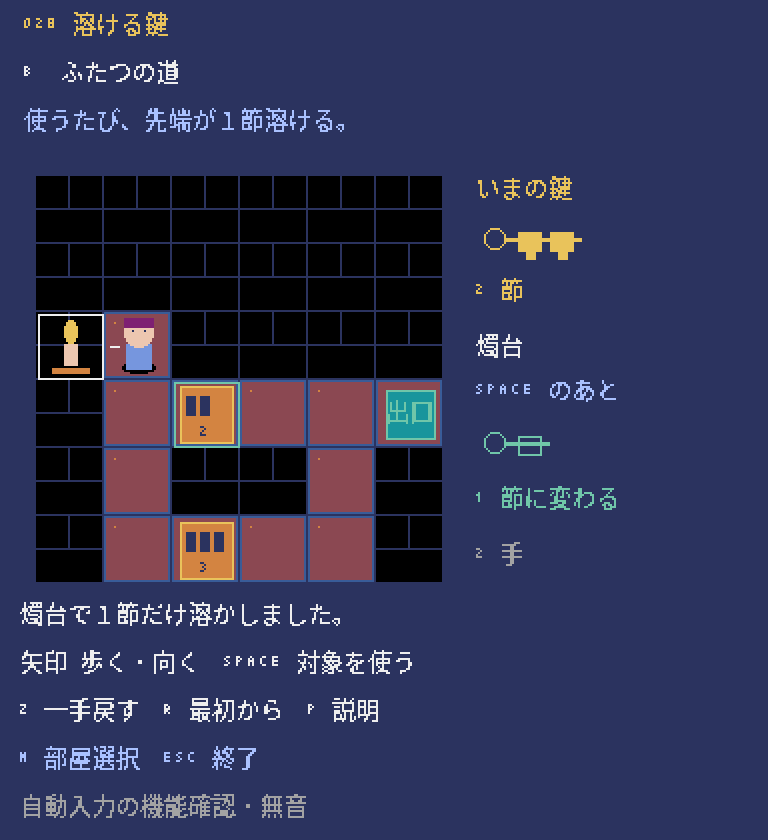
この講座のもとになった完成版のゲームを、ブラウザーでそのまま遊べます。キーボードで操作するので、PCで開いてください(スマホのタッチ操作には対応していません)。初めて開くときは、読み込みに少し時間がかかります。
完成版の主な操作:矢印キーで移動・向きを変える、Spaceで錠や燭台を使う、Zで1手戻す、Rでやり直し、Pで一時停止、Mで部屋を選ぶ
ボタンを押すと、ゲームの読み込みが始まります。
画面に「CLICK TO START」と出たらクリックします。続けてゲーム画面を一度クリックすると、キー操作が効くようになります。ゲームを終えるときは、枠の外にある「閉じる」ボタンを使ってください(Escキーの働きはゲームごとに違います)。ゲーム内のセーブは、閉じる・ページを移る・再読み込みすると消えます。
うまく表示されないとき
ゲームを動かすためのプログラム(Pyxel 2.9.9)は、外部の配信サービス(jsDelivr)から読み込みます。表示されないときは「最初から再読込」を押すか、完成版のソースをダウンロードしてPCで実行してください。ブラウザー版の録画機能は止めています。ブラウザー版で確認できている範囲は検証状況にまとめています。
鍵の変化で、次の条件を作る。
いきなり完成版のコードを全部読む必要はありません。小さなゲームにルールを1つずつ足しながら、5つのステップで作っていきます。どのステップのファイルもそれだけで動くので、動きを確かめてから次へ進みましょう。
- 必要な環境
- Python 3.11以上 / Pyxel 2.9.9
- 知っておくとよいこと
- 変数・if・関数の基本
- 教材に入っているもの
- ステップごとに動くPythonファイル5本・説明・動作確認用のテスト
- 完成した教材の操作
- 矢印:歩く・向きを変える / Space:向いている錠を使う / Z:1手戻す(04〜05) / R:やり直し
- 難易度の目安
- 初級このページで使うプログラムの考え方の数と難しさから決めた目安です。難易度について
- 学習順に迷ったら
- おすすめの学ぶ順番を見る
コードを書き換えたら、ファイルを保存し、動いているゲームを閉じてから、もう一度同じ.pyを実行します。ゲーム中にRキーなどで「やり直し」をしても、書き換えたコードは読み込まれません。
教材のゲーム画面は、日本語フォントを用意しなくても動くように英語で表示しています。ファイルには動作確認用のコードも入っていますが、最初は Game / State・update・draw の3つに注目すれば十分です。わからない言葉は用語集で調べられます。class・self・dataclass はPythonの状態、キー入力と時間の扱いは入力・更新・描画、マス目とピクセルの違いは画面とマップの座標のページで詳しく説明しています。
歩く位置と向きを分ける
世界の状態と、どれを操作するかの選択を分ける。
State は、位置・鍵の長さ・開いた扉・手数を持つ、あとから変更できない値です。矢印キーを押すと、まず向き facing を変えてから、transition で移動を試します。壁のほうを向いた場合は位置が変わらず、手数も増えません。この段階にはまだ扉がなく、右端の OUT まで歩く練習です。SPACE で使えるものもまだありません。
下のコードは 01_walk.py の一部です。前のステップから追加・変更したところだけを抜き出しています。
def move(self, direction):
    self.facing = direction
    return self.act(direction)
実行して確かめる
教材のZIPを展開したフォルダーで、次のコマンドを実行します。
.venv\Scripts\python.exe 01_walk.py.venv/bin/python 01_walk.py- 壁への向き変更は0手
- 右へ5歩でクリア
- Rで位置と向きを初期化
moves を増やすと、壁のほうを向くだけの操作も手数に数えられてしまいます。手数は、歩けることを確かめた transition の中で増やします。最初に上・下・左を押して、位置・手数・白い枠を見比べましょう。そのあと右へ5回歩き、ゴールしたあとは動けなくなることを確かめます。
このステップのコード全文(224行)
# MIT License
#
# Copyright (c) 2026 Pyxel 100 contributors
#
# Permission is hereby granted, free of charge, to any person obtaining a copy
# of this software and associated documentation files (the "Software"), to deal
# in the Software without restriction, including without limitation the rights
# to use, copy, modify, merge, publish, distribute, sublicense, and/or sell
# copies of the Software, and to permit persons to whom the Software is
# furnished to do so, subject to the following conditions:
#
# The above copyright notice and this permission notice shall be included in all
# copies or substantial portions of the Software.
#
# THE SOFTWARE IS PROVIDED "AS IS", WITHOUT WARRANTY OF ANY KIND, EXPRESS OR
# IMPLIED, INCLUDING BUT NOT LIMITED TO THE WARRANTIES OF MERCHANTABILITY,
# FITNESS FOR A PARTICULAR PURPOSE AND NONINFRINGEMENT. IN NO EVENT SHALL THE
# AUTHORS OR COPYRIGHT HOLDERS BE LIABLE FOR ANY CLAIM, DAMAGES OR OTHER
# LIABILITY, WHETHER IN AN ACTION OF CONTRACT, TORT OR OTHERWISE, ARISING FROM,
# OUT OF OR IN CONNECTION WITH THE SOFTWARE OR THE USE OR OTHER DEALINGS IN THE
# SOFTWARE.
#
# The bundled Noto-derived bitmap glyphs are separately licensed under SIL OFL.
# See assets/NOTO-LICENSE.txt.

# 教材は図形とASCII文字のみ。上記の別ライセンス字体は同梱しません。

"""溶ける鍵・教材 1/5。各ファイルは単独で実行できます。
実行: python 01_walk.py
"""
from dataclasses import dataclass, replace

DIRECTIONS = {"U": (0, -1), "R": (1, 0), "D": (0, 1), "L": (-1, 0)}
ARROWS = {"UP": "U", "RIGHT": "R", "DOWN": "D", "LEFT": "L"}


@dataclass(frozen=True)
class Door:
    id: str
    pos: tuple
    size: int


@dataclass(frozen=True)
class State:
    player: tuple
    length: int = 3
    opened: int = 0  # 各ビットが各扉に対応する。1なら開いている。
    moves: int = 0


@dataclass(frozen=True)
class Result:
    state: State
    accepted: bool
    reason: str


FLOORS = frozenset({(0, 2), (1, 2), (2, 2), (3, 2), (4, 2), (5, 2)})
START = (0, 2)
EXIT = (5, 2)
DOORS = ()  # まだ錠は置かない。


def neighbor(player, direction):
    dx, dy = DIRECTIONS[direction]
    return player[0] + dx, player[1] + dy


def won(state):
    return state.player == EXIT


def is_open(state, index):
    return bool(state.opened & (1 << index))


def walkable(state, pos):
    return pos in FLOORS or any(
        door.pos == pos and is_open(state, index)
        for index, door in enumerate(DOORS)
    )


def transition(state, action):
    """世界の変更はここだけ。拒否では同じStateを返す。"""
    if won(state):
        return Result(state, False, "complete")
    if action in DIRECTIONS:
        pos = neighbor(state.player, action)
        if not walkable(state, pos):
            reason = "door" if any(d.pos == pos for d in DOORS) else "wall"
            return Result(state, False, reason)
        next_state = replace(state, player=pos, moves=state.moves + 1)
        reason = "complete" if won(next_state) else "walk"
        return Result(next_state, True, reason)
    return Result(state, False, "invalid")


class World:
    def __init__(self):
        self.reset()

    def reset(self):
        self.state = State(START)
        self.facing = "R"  # 向きは対象選択。世界のStateには入れない。
        self.reason = "ready"

    def act(self, action):
        result = transition(self.state, action)
        self.reason = result.reason
        if result.accepted:
            self.state = result.state
        return result.accepted

    def move(self, direction):
        self.facing = direction
        return self.act(direction)

    def target(self):
        pos = neighbor(self.state.player, self.facing)
        return next((door.id for door in DOORS if door.pos == pos), "")

    def use(self):
        return self.act("use:" + self.target())


def main(headless=False, screenshot=None, world=None):
    """Pyxelはここでだけ読み込む。ルールのテストには不要。"""
    import pyxel
    from pathlib import Path

    world = world if world is not None else World()
    if screenshot:
        screenshot = str(Path(screenshot).resolve())
        Path(screenshot).parent.mkdir(parents=True, exist_ok=True)

    def update():
        # frame_count 0..11 の描画を終えてから保存して終了する。
        if headless and pyxel.frame_count >= 12:
            if screenshot:
                pyxel.screenshot(str(screenshot), scale=2)
            pyxel.quit()
            return
        names = tuple(ARROWS) + ("SPACE", "R")
        pressed = {name for name in names if pyxel.btnp(getattr(pyxel, "KEY_" + name))}
        # 複数の新規押下は処理しない。第5段階で保持中のキーも扱う。
        if len(pressed) != 1:
            return
        key = next(iter(pressed))
        if key == "R":
            world.reset()
        elif won(world.state):
            return
        elif key in ARROWS:
            world.move(ARROWS[key])
        elif key == "SPACE":
            world.use()

    def draw():
        pyxel.cls(1)
        pyxel.text(12, 10, "MELTING KEY / STEP 1", 10)
        pyxel.text(12, 24, "WALK TO OUT / NO LOCKS YET", 6)
        for y in range(6):
            for x in range(6):
                pos = (x, y)
                px, py = 16 + x * 32, 48 + y * 32
                floor = pos in FLOORS or any(d.pos == pos for d in DOORS)
                pyxel.rect(px, py, 31, 31, 4 if floor else 0)
                pyxel.rectb(px, py, 31, 31, 5 if floor else 1)
        ex, ey = 16 + EXIT[0] * 32, 48 + EXIT[1] * 32
        pyxel.rect(ex + 3, ey + 3, 25, 25, 3)
        pyxel.text(ex + 8, ey + 12, "OUT", 11)
        for index, door in enumerate(DOORS):
            px, py = 16 + door.pos[0] * 32, 48 + door.pos[1] * 32
            opened = is_open(world.state, index)
            if opened:
                pyxel.rectb(px + 3, py + 3, 25, 25, 9)
                pyxel.text(px + 6, py + 12, "OPEN", 9)
            else:
                pyxel.rect(px + 3, py + 3, 25, 25, 9)
                pyxel.text(px + 14, py + 16, str(door.size), 1)
                for tooth in range(door.size):
                    pyxel.rect(px + 6 + tooth * 7, py + 6, 4, 6, 1)
                if door.size == world.state.length:
                    pyxel.rectb(px + 1, py + 1, 29, 29, 11)
        tx, ty = neighbor(world.state.player, world.facing)
        if 0 <= tx < 6 and 0 <= ty < 6:
            pyxel.rectb(16 + tx * 32, 48 + ty * 32, 31, 31, 7)
        px = 32 + world.state.player[0] * 32
        py = 64 + world.state.player[1] * 32
        pyxel.circ(px, py - 5, 5, 15)
        pyxel.rect(px - 5, py + 1, 11, 9, 12)
        dx, dy = DIRECTIONS[world.facing]
        pyxel.line(px + dx * 9, py + dy * 9, px + dx * 13, py + dy * 13, 7)
        pyxel.text(222, 52, "WAX KEY", 10)
        pyxel.text(222, 65, f"LENGTH {world.state.length}", 7)
        pyxel.circb(229, 87, 5, 10)
        pyxel.line(234, 87, 240 + world.state.length * 16, 87, 10)
        for tooth in range(world.state.length):
            pyxel.rect(241 + tooth * 16, 84, 11, 8, 10)
            pyxel.rect(245 + tooth * 16, 92, 4, 3, 10)
        pyxel.text(222, 108, f"MOVES {world.state.moves}", 7)
        pyxel.text(222, 121, "WHITE: TARGET", 7)
        pyxel.text(222, 133, "GREEN: MATCH", 11)
        pyxel.text(12, 250, "CLEAR!" if won(world.state) else world.reason.upper(), 10)
        pyxel.text(12, 268, "ARROWS: WALK / FACE  SPACE: USE", 7)
        pyxel.text(12, 282, "R: RESET  ESC: QUIT", 6)
        pyxel.text(12, 308, "NO TIMER / SILENT / KEYS ONE AT A TIME", 13)

    pyxel.init(320, 328, title="Melting Key - Stage 1", fps=30, headless=headless)
    pyxel.run(update, draw)


if __name__ == "__main__":
    import argparse
    parser = argparse.ArgumentParser(description=__doc__)
    parser.add_argument("--headless-smoke", action="store_true", help="12 frames then quit")
    parser.add_argument("--screenshot", help="PNG path; used with --headless-smoke")
    args = parser.parse_args()
    if args.screenshot and not args.headless_smoke:
        parser.error("--screenshot requires --headless-smoke")
main(headless=args.headless_smoke, screenshot=args.screenshot)合う錠だけ開けて1節溶かす
先に調べて、状態を変えるのは最後に。
3節の錠を1枚追加します。「錠があるか」「となりにあるか」「まだ開いていないか」「鍵が0ではないか」「長さが合っているか」を順番に確かめます。すべて通ったときだけ、opened に開いた印をつけ、length を1減らし、moves を1増やした新しい State を作ります。SPACE で錠を開けるときは、人物は動きません。 opened は、扉ごとの「開いている印」を1桁ずつ持つ整数です。1 << 0 は2進数で001、1 << 1 は010です。たとえば opened=1(001)に | で010の印を重ねると3(011)になり、2枚分の開いた印を同時に覚えておけます。& で同じ印を取り出すと、その扉が開いているか調べられます。replace は、元の State を変えずに、指定した項目だけが違う新しい State を作る関数です。
下のコードは 02_unlock.py の一部です。前のステップから追加・変更したところだけを抜き出しています。
next_state = replace(state, length=state.length - 1,
                     opened=state.opened | (1 << index), moves=state.moves + 1)
return Result(next_state, True, "unlocked")
実行して確かめる
教材のZIPを展開したフォルダーで、次のコマンドを実行します。
.venv\Scripts\python.exe 02_unlock.py.venv/bin/python 02_unlock.py- 一致したときだけ1節減る
- 開錠で歩かない
- 開いた扉を使っても減らない
最初の State の length を2にしてみましょう。SPACE を押すと MISMATCH(合わない)になり、位置・扉・手数・鍵が変わらないことを確かめたら、3に戻します。
このステップのコード全文(243行)
# MIT License
#
# Copyright (c) 2026 Pyxel 100 contributors
#
# Permission is hereby granted, free of charge, to any person obtaining a copy
# of this software and associated documentation files (the "Software"), to deal
# in the Software without restriction, including without limitation the rights
# to use, copy, modify, merge, publish, distribute, sublicense, and/or sell
# copies of the Software, and to permit persons to whom the Software is
# furnished to do so, subject to the following conditions:
#
# The above copyright notice and this permission notice shall be included in all
# copies or substantial portions of the Software.
#
# THE SOFTWARE IS PROVIDED "AS IS", WITHOUT WARRANTY OF ANY KIND, EXPRESS OR
# IMPLIED, INCLUDING BUT NOT LIMITED TO THE WARRANTIES OF MERCHANTABILITY,
# FITNESS FOR A PARTICULAR PURPOSE AND NONINFRINGEMENT. IN NO EVENT SHALL THE
# AUTHORS OR COPYRIGHT HOLDERS BE LIABLE FOR ANY CLAIM, DAMAGES OR OTHER
# LIABILITY, WHETHER IN AN ACTION OF CONTRACT, TORT OR OTHERWISE, ARISING FROM,
# OUT OF OR IN CONNECTION WITH THE SOFTWARE OR THE USE OR OTHER DEALINGS IN THE
# SOFTWARE.
#
# The bundled Noto-derived bitmap glyphs are separately licensed under SIL OFL.
# See assets/NOTO-LICENSE.txt.

# 教材は図形とASCII文字のみ。上記の別ライセンス字体は同梱しません。

"""溶ける鍵・教材 2/5。各ファイルは単独で実行できます。
実行: python 02_unlock.py
"""
from dataclasses import dataclass, replace

DIRECTIONS = {"U": (0, -1), "R": (1, 0), "D": (0, 1), "L": (-1, 0)}
ARROWS = {"UP": "U", "RIGHT": "R", "DOWN": "D", "LEFT": "L"}


@dataclass(frozen=True)
class Door:
    id: str
    pos: tuple
    size: int


@dataclass(frozen=True)
class State:
    player: tuple
    length: int = 3
    opened: int = 0  # 各ビットが各扉に対応する。1なら開いている。
    moves: int = 0


@dataclass(frozen=True)
class Result:
    state: State
    accepted: bool
    reason: str


FLOORS = frozenset({(1, 3), (3, 3)})
START = (1, 3)
EXIT = (3, 3)
DOORS = (Door("d0", (2, 3), 3),)  # 3節の錠を1枚だけ置く。


def neighbor(player, direction):
    dx, dy = DIRECTIONS[direction]
    return player[0] + dx, player[1] + dy


def won(state):
    return state.player == EXIT


def is_open(state, index):
    return bool(state.opened & (1 << index))


def walkable(state, pos):
    return pos in FLOORS or any(
        door.pos == pos and is_open(state, index)
        for index, door in enumerate(DOORS)
    )


def transition(state, action):
    """世界の変更はここだけ。拒否では同じStateを返す。"""
    if won(state):
        return Result(state, False, "complete")
    if action in DIRECTIONS:
        pos = neighbor(state.player, action)
        if not walkable(state, pos):
            reason = "door" if any(d.pos == pos for d in DOORS) else "wall"
            return Result(state, False, reason)
        next_state = replace(state, player=pos, moves=state.moves + 1)
        reason = "complete" if won(next_state) else "walk"
        return Result(next_state, True, reason)
    if not action.startswith("use:"):
        return Result(state, False, "invalid")
    target = action[4:]
    door = next((d for d in DOORS if d.id == target), None)
    if door is None:
        return Result(state, False, "no_target")
    distance = abs(door.pos[0] - state.player[0]) + abs(door.pos[1] - state.player[1])
    if distance != 1:
        return Result(state, False, "not_adjacent")
    index = DOORS.index(door)
    if is_open(state, index):
        return Result(state, False, "already_open")
    if state.length == 0:
        return Result(state, False, "empty")
    if door.size != state.length:
        return Result(state, False, "mismatch")
    # 全条件を確認したあと、開錠・融解・手数を一度に確定する。
    next_state = replace(state, length=state.length - 1,
                         opened=state.opened | (1 << index), moves=state.moves + 1)
    return Result(next_state, True, "unlocked")


class World:
    def __init__(self):
        self.reset()

    def reset(self):
        self.state = State(START)
        self.facing = "R"  # 向きは対象選択。世界のStateには入れない。
        self.reason = "ready"

    def act(self, action):
        result = transition(self.state, action)
        self.reason = result.reason
        if result.accepted:
            self.state = result.state
        return result.accepted

    def move(self, direction):
        self.facing = direction
        return self.act(direction)

    def target(self):
        pos = neighbor(self.state.player, self.facing)
        return next((door.id for door in DOORS if door.pos == pos), "")

    def use(self):
        return self.act("use:" + self.target())


def main(headless=False, screenshot=None, world=None):
    """Pyxelはここでだけ読み込む。ルールのテストには不要。"""
    import pyxel
    from pathlib import Path

    world = world if world is not None else World()
    if screenshot:
        screenshot = str(Path(screenshot).resolve())
        Path(screenshot).parent.mkdir(parents=True, exist_ok=True)

    def update():
        # frame_count 0..11 の描画を終えてから保存して終了する。
        if headless and pyxel.frame_count >= 12:
            if screenshot:
                pyxel.screenshot(str(screenshot), scale=2)
            pyxel.quit()
            return
        names = tuple(ARROWS) + ("SPACE", "R")
        pressed = {name for name in names if pyxel.btnp(getattr(pyxel, "KEY_" + name))}
        # 複数の新規押下は処理しない。第5段階で保持中のキーも扱う。
        if len(pressed) != 1:
            return
        key = next(iter(pressed))
        if key == "R":
            world.reset()
        elif won(world.state):
            return
        elif key in ARROWS:
            world.move(ARROWS[key])
        elif key == "SPACE":
            world.use()

    def draw():
        pyxel.cls(1)
        pyxel.text(12, 10, "MELTING KEY / STEP 2", 10)
        pyxel.text(12, 24, "ONE LOCK / THREE TEETH", 6)
        for y in range(6):
            for x in range(6):
                pos = (x, y)
                px, py = 16 + x * 32, 48 + y * 32
                floor = pos in FLOORS or any(d.pos == pos for d in DOORS)
                pyxel.rect(px, py, 31, 31, 4 if floor else 0)
                pyxel.rectb(px, py, 31, 31, 5 if floor else 1)
        ex, ey = 16 + EXIT[0] * 32, 48 + EXIT[1] * 32
        pyxel.rect(ex + 3, ey + 3, 25, 25, 3)
        pyxel.text(ex + 8, ey + 12, "OUT", 11)
        for index, door in enumerate(DOORS):
            px, py = 16 + door.pos[0] * 32, 48 + door.pos[1] * 32
            opened = is_open(world.state, index)
            if opened:
                pyxel.rectb(px + 3, py + 3, 25, 25, 9)
                pyxel.text(px + 6, py + 12, "OPEN", 9)
            else:
                pyxel.rect(px + 3, py + 3, 25, 25, 9)
                pyxel.text(px + 14, py + 16, str(door.size), 1)
                for tooth in range(door.size):
                    pyxel.rect(px + 6 + tooth * 7, py + 6, 4, 6, 1)
                if door.size == world.state.length:
                    pyxel.rectb(px + 1, py + 1, 29, 29, 11)
        tx, ty = neighbor(world.state.player, world.facing)
        if 0 <= tx < 6 and 0 <= ty < 6:
            pyxel.rectb(16 + tx * 32, 48 + ty * 32, 31, 31, 7)
        px = 32 + world.state.player[0] * 32
        py = 64 + world.state.player[1] * 32
        pyxel.circ(px, py - 5, 5, 15)
        pyxel.rect(px - 5, py + 1, 11, 9, 12)
        dx, dy = DIRECTIONS[world.facing]
        pyxel.line(px + dx * 9, py + dy * 9, px + dx * 13, py + dy * 13, 7)
        pyxel.text(222, 52, "WAX KEY", 10)
        pyxel.text(222, 65, f"LENGTH {world.state.length}", 7)
        pyxel.circb(229, 87, 5, 10)
        pyxel.line(234, 87, 240 + world.state.length * 16, 87, 10)
        for tooth in range(world.state.length):
            pyxel.rect(241 + tooth * 16, 84, 11, 8, 10)
            pyxel.rect(245 + tooth * 16, 92, 4, 3, 10)
        pyxel.text(222, 108, f"MOVES {world.state.moves}", 7)
        pyxel.text(222, 121, "WHITE: TARGET", 7)
        pyxel.text(222, 133, "GREEN: MATCH", 11)
        pyxel.text(12, 250, "CLEAR!" if won(world.state) else world.reason.upper(), 10)
        pyxel.text(12, 268, "ARROWS: WALK / FACE  SPACE: USE", 7)
        pyxel.text(12, 282, "R: RESET  ESC: QUIT", 6)
        pyxel.text(12, 308, "NO TIMER / SILENT / KEYS ONE AT A TIME", 13)

    pyxel.init(320, 328, title="Melting Key - Stage 2", fps=30, headless=headless)
    pyxel.run(update, draw)


if __name__ == "__main__":
    import argparse
    parser = argparse.ArgumentParser(description=__doc__)
    parser.add_argument("--headless-smoke", action="store_true", help="12 frames then quit")
    parser.add_argument("--screenshot", help="PNG path; used with --headless-smoke")
    args = parser.parse_args()
    if args.screenshot and not args.headless_smoke:
        parser.error("--screenshot requires --headless-smoke")
main(headless=args.headless_smoke, screenshot=args.screenshot)短くなった鍵を次の錠へ
開いた扉は、そのまま通れる床として残す。
元のゲームの A の部屋と同じ配置に広げます。3節の錠を開けると鍵は2節になり、その鍵が次の2節の錠に合います。walkable は、床か開いた扉なら通れると判定します。opened は扉ごとに1ビットで記録しているので、2枚目を開けても最初の扉は閉じません。時間がたつと鍵が減るような処理はありません。
下のコードは 03_chain.py の一部です。前のステップから追加・変更したところだけを抜き出しています。
def walkable(state, pos):
    return pos in FLOORS or any(
        door.pos == pos and is_open(state, index)
        for index, door in enumerate(DOORS)
    )
実行して確かめる
教材のZIPを展開したフォルダーで、次のコマンドを実行します。
.venv\Scripts\python.exe 03_chain.py.venv/bin/python 03_chain.py- 3節から2節の錠へ進める
- 開いた扉は床になる
- 往復では鍵を消費しない
最初の錠を開けたあと、右・左を3往復してから続きを解いてみましょう。手数は増えても、鍵と opened は変わらないことを確かめます。
このステップのコード全文(244行)
# MIT License
#
# Copyright (c) 2026 Pyxel 100 contributors
#
# Permission is hereby granted, free of charge, to any person obtaining a copy
# of this software and associated documentation files (the "Software"), to deal
# in the Software without restriction, including without limitation the rights
# to use, copy, modify, merge, publish, distribute, sublicense, and/or sell
# copies of the Software, and to permit persons to whom the Software is
# furnished to do so, subject to the following conditions:
#
# The above copyright notice and this permission notice shall be included in all
# copies or substantial portions of the Software.
#
# THE SOFTWARE IS PROVIDED "AS IS", WITHOUT WARRANTY OF ANY KIND, EXPRESS OR
# IMPLIED, INCLUDING BUT NOT LIMITED TO THE WARRANTIES OF MERCHANTABILITY,
# FITNESS FOR A PARTICULAR PURPOSE AND NONINFRINGEMENT. IN NO EVENT SHALL THE
# AUTHORS OR COPYRIGHT HOLDERS BE LIABLE FOR ANY CLAIM, DAMAGES OR OTHER
# LIABILITY, WHETHER IN AN ACTION OF CONTRACT, TORT OR OTHERWISE, ARISING FROM,
# OUT OF OR IN CONNECTION WITH THE SOFTWARE OR THE USE OR OTHER DEALINGS IN THE
# SOFTWARE.
#
# The bundled Noto-derived bitmap glyphs are separately licensed under SIL OFL.
# See assets/NOTO-LICENSE.txt.

# 教材は図形とASCII文字のみ。上記の別ライセンス字体は同梱しません。

"""溶ける鍵・教材 3/5。各ファイルは単独で実行できます。
実行: python 03_chain.py
"""
from dataclasses import dataclass, replace

DIRECTIONS = {"U": (0, -1), "R": (1, 0), "D": (0, 1), "L": (-1, 0)}
ARROWS = {"UP": "U", "RIGHT": "R", "DOWN": "D", "LEFT": "L"}


@dataclass(frozen=True)
class Door:
    id: str
    pos: tuple
    size: int


@dataclass(frozen=True)
class State:
    player: tuple
    length: int = 3
    opened: int = 0  # 各ビットが各扉に対応する。1なら開いている。
    moves: int = 0


@dataclass(frozen=True)
class Result:
    state: State
    accepted: bool
    reason: str


# 原作Aと同じ床・開始位置・出口・錠。
FLOORS = frozenset({(0, 2), (1, 2), (3, 2), (5, 2)})
START = (0, 2)
EXIT = (5, 2)
DOORS = (Door("d0", (2, 2), 3), Door("d1", (4, 2), 2))


def neighbor(player, direction):
    dx, dy = DIRECTIONS[direction]
    return player[0] + dx, player[1] + dy


def won(state):
    return state.player == EXIT


def is_open(state, index):
    return bool(state.opened & (1 << index))


def walkable(state, pos):
    return pos in FLOORS or any(
        door.pos == pos and is_open(state, index)
        for index, door in enumerate(DOORS)
    )


def transition(state, action):
    """世界の変更はここだけ。拒否では同じStateを返す。"""
    if won(state):
        return Result(state, False, "complete")
    if action in DIRECTIONS:
        pos = neighbor(state.player, action)
        if not walkable(state, pos):
            reason = "door" if any(d.pos == pos for d in DOORS) else "wall"
            return Result(state, False, reason)
        next_state = replace(state, player=pos, moves=state.moves + 1)
        reason = "complete" if won(next_state) else "walk"
        return Result(next_state, True, reason)
    if not action.startswith("use:"):
        return Result(state, False, "invalid")
    target = action[4:]
    door = next((d for d in DOORS if d.id == target), None)
    if door is None:
        return Result(state, False, "no_target")
    distance = abs(door.pos[0] - state.player[0]) + abs(door.pos[1] - state.player[1])
    if distance != 1:
        return Result(state, False, "not_adjacent")
    index = DOORS.index(door)
    if is_open(state, index):
        return Result(state, False, "already_open")
    if state.length == 0:
        return Result(state, False, "empty")
    if door.size != state.length:
        return Result(state, False, "mismatch")
    # 全条件を確認したあと、開錠・融解・手数を一度に確定する。
    next_state = replace(state, length=state.length - 1,
                         opened=state.opened | (1 << index), moves=state.moves + 1)
    return Result(next_state, True, "unlocked")


class World:
    def __init__(self):
        self.reset()

    def reset(self):
        self.state = State(START)
        self.facing = "R"  # 向きは対象選択。世界のStateには入れない。
        self.reason = "ready"

    def act(self, action):
        result = transition(self.state, action)
        self.reason = result.reason
        if result.accepted:
            self.state = result.state
        return result.accepted

    def move(self, direction):
        self.facing = direction
        return self.act(direction)

    def target(self):
        pos = neighbor(self.state.player, self.facing)
        return next((door.id for door in DOORS if door.pos == pos), "")

    def use(self):
        return self.act("use:" + self.target())


def main(headless=False, screenshot=None, world=None):
    """Pyxelはここでだけ読み込む。ルールのテストには不要。"""
    import pyxel
    from pathlib import Path

    world = world if world is not None else World()
    if screenshot:
        screenshot = str(Path(screenshot).resolve())
        Path(screenshot).parent.mkdir(parents=True, exist_ok=True)

    def update():
        # frame_count 0..11 の描画を終えてから保存して終了する。
        if headless and pyxel.frame_count >= 12:
            if screenshot:
                pyxel.screenshot(str(screenshot), scale=2)
            pyxel.quit()
            return
        names = tuple(ARROWS) + ("SPACE", "R")
        pressed = {name for name in names if pyxel.btnp(getattr(pyxel, "KEY_" + name))}
        # 複数の新規押下は処理しない。第5段階で保持中のキーも扱う。
        if len(pressed) != 1:
            return
        key = next(iter(pressed))
        if key == "R":
            world.reset()
        elif won(world.state):
            return
        elif key in ARROWS:
            world.move(ARROWS[key])
        elif key == "SPACE":
            world.use()

    def draw():
        pyxel.cls(1)
        pyxel.text(12, 10, "MELTING KEY / STEP 3", 10)
        pyxel.text(12, 24, "A: THREE THEN TWO", 6)
        for y in range(6):
            for x in range(6):
                pos = (x, y)
                px, py = 16 + x * 32, 48 + y * 32
                floor = pos in FLOORS or any(d.pos == pos for d in DOORS)
                pyxel.rect(px, py, 31, 31, 4 if floor else 0)
                pyxel.rectb(px, py, 31, 31, 5 if floor else 1)
        ex, ey = 16 + EXIT[0] * 32, 48 + EXIT[1] * 32
        pyxel.rect(ex + 3, ey + 3, 25, 25, 3)
        pyxel.text(ex + 8, ey + 12, "OUT", 11)
        for index, door in enumerate(DOORS):
            px, py = 16 + door.pos[0] * 32, 48 + door.pos[1] * 32
            opened = is_open(world.state, index)
            if opened:
                pyxel.rectb(px + 3, py + 3, 25, 25, 9)
                pyxel.text(px + 6, py + 12, "OPEN", 9)
            else:
                pyxel.rect(px + 3, py + 3, 25, 25, 9)
                pyxel.text(px + 14, py + 16, str(door.size), 1)
                for tooth in range(door.size):
                    pyxel.rect(px + 6 + tooth * 7, py + 6, 4, 6, 1)
                if door.size == world.state.length:
                    pyxel.rectb(px + 1, py + 1, 29, 29, 11)
        tx, ty = neighbor(world.state.player, world.facing)
        if 0 <= tx < 6 and 0 <= ty < 6:
            pyxel.rectb(16 + tx * 32, 48 + ty * 32, 31, 31, 7)
        px = 32 + world.state.player[0] * 32
        py = 64 + world.state.player[1] * 32
        pyxel.circ(px, py - 5, 5, 15)
        pyxel.rect(px - 5, py + 1, 11, 9, 12)
        dx, dy = DIRECTIONS[world.facing]
        pyxel.line(px + dx * 9, py + dy * 9, px + dx * 13, py + dy * 13, 7)
        pyxel.text(222, 52, "WAX KEY", 10)
        pyxel.text(222, 65, f"LENGTH {world.state.length}", 7)
        pyxel.circb(229, 87, 5, 10)
        pyxel.line(234, 87, 240 + world.state.length * 16, 87, 10)
        for tooth in range(world.state.length):
            pyxel.rect(241 + tooth * 16, 84, 11, 8, 10)
            pyxel.rect(245 + tooth * 16, 92, 4, 3, 10)
        pyxel.text(222, 108, f"MOVES {world.state.moves}", 7)
        pyxel.text(222, 121, "WHITE: TARGET", 7)
        pyxel.text(222, 133, "GREEN: MATCH", 11)
        pyxel.text(12, 250, "CLEAR!" if won(world.state) else world.reason.upper(), 10)
        pyxel.text(12, 268, "ARROWS: WALK / FACE  SPACE: USE", 7)
        pyxel.text(12, 282, "R: RESET  ESC: QUIT", 6)
        pyxel.text(12, 308, "NO TIMER / SILENT / KEYS ONE AT A TIME", 13)

    pyxel.init(320, 328, title="Melting Key - Stage 3", fps=30, headless=headless)
    pyxel.run(update, draw)


if __name__ == "__main__":
    import argparse
    parser = argparse.ArgumentParser(description=__doc__)
    parser.add_argument("--headless-smoke", action="store_true", help="12 frames then quit")
    parser.add_argument("--screenshot", help="PNG path; used with --headless-smoke")
    args = parser.parse_args()
    if args.screenshot and not args.headless_smoke:
        parser.error("--screenshot requires --headless-smoke")
main(headless=args.headless_smoke, screenshot=args.screenshot)一手前の世界を丸ごと戻す
成功した行動の直前の状態だけを、履歴に残す。
act で行動が成功したときだけ、変える前の State を past に積みます。Z キーでは最後の State を取り出し、位置・鍵・すべての扉・手数をまとめて元に戻します。壁のほうを向いただけの操作や、うまくいかなかった操作は履歴に入れません。向き facing も、undo(取り消し)の対象外です。クリアしたあとでも、Z で最後の1歩を戻せます。R キーは履歴ごと最初に戻します。
下のコードは 04_undo.py の一部です。前のステップから追加・変更したところだけを抜き出しています。
if result.accepted:
    self.past.append(self.state)
    self.state = result.state
実行して確かめる
教材のZIPを展開したフォルダーで、次のコマンドを実行します。
.venv\Scripts\python.exe 04_undo.py.venv/bin/python 04_undo.py- 成功した行動だけ履歴に入る
- 鍵と扉と手数も復元
- クリア後のZとRも動く
State 全体を保存し、向きのような「選んでいるだけの情報」は外に置きます。クリアしたあとに Z を1回押して、出口の前に戻ることを確かめましょう。続けて Z を押していくと、最後に開けた錠、最初に開けた錠の順に取り消されます。
このステップのコード全文(255行)
# MIT License
#
# Copyright (c) 2026 Pyxel 100 contributors
#
# Permission is hereby granted, free of charge, to any person obtaining a copy
# of this software and associated documentation files (the "Software"), to deal
# in the Software without restriction, including without limitation the rights
# to use, copy, modify, merge, publish, distribute, sublicense, and/or sell
# copies of the Software, and to permit persons to whom the Software is
# furnished to do so, subject to the following conditions:
#
# The above copyright notice and this permission notice shall be included in all
# copies or substantial portions of the Software.
#
# THE SOFTWARE IS PROVIDED "AS IS", WITHOUT WARRANTY OF ANY KIND, EXPRESS OR
# IMPLIED, INCLUDING BUT NOT LIMITED TO THE WARRANTIES OF MERCHANTABILITY,
# FITNESS FOR A PARTICULAR PURPOSE AND NONINFRINGEMENT. IN NO EVENT SHALL THE
# AUTHORS OR COPYRIGHT HOLDERS BE LIABLE FOR ANY CLAIM, DAMAGES OR OTHER
# LIABILITY, WHETHER IN AN ACTION OF CONTRACT, TORT OR OTHERWISE, ARISING FROM,
# OUT OF OR IN CONNECTION WITH THE SOFTWARE OR THE USE OR OTHER DEALINGS IN THE
# SOFTWARE.
#
# The bundled Noto-derived bitmap glyphs are separately licensed under SIL OFL.
# See assets/NOTO-LICENSE.txt.

# 教材は図形とASCII文字のみ。上記の別ライセンス字体は同梱しません。

"""溶ける鍵・教材 4/5。各ファイルは単独で実行できます。
実行: python 04_undo.py
"""
from dataclasses import dataclass, replace

DIRECTIONS = {"U": (0, -1), "R": (1, 0), "D": (0, 1), "L": (-1, 0)}
ARROWS = {"UP": "U", "RIGHT": "R", "DOWN": "D", "LEFT": "L"}


@dataclass(frozen=True)
class Door:
    id: str
    pos: tuple
    size: int


@dataclass(frozen=True)
class State:
    player: tuple
    length: int = 3
    opened: int = 0  # 各ビットが各扉に対応する。1なら開いている。
    moves: int = 0


@dataclass(frozen=True)
class Result:
    state: State
    accepted: bool
    reason: str


# 原作Aと同じ床・開始位置・出口・錠。
FLOORS = frozenset({(0, 2), (1, 2), (3, 2), (5, 2)})
START = (0, 2)
EXIT = (5, 2)
DOORS = (Door("d0", (2, 2), 3), Door("d1", (4, 2), 2))


def neighbor(player, direction):
    dx, dy = DIRECTIONS[direction]
    return player[0] + dx, player[1] + dy


def won(state):
    return state.player == EXIT


def is_open(state, index):
    return bool(state.opened & (1 << index))


def walkable(state, pos):
    return pos in FLOORS or any(
        door.pos == pos and is_open(state, index)
        for index, door in enumerate(DOORS)
    )


def transition(state, action):
    """世界の変更はここだけ。拒否では同じStateを返す。"""
    if won(state):
        return Result(state, False, "complete")
    if action in DIRECTIONS:
        pos = neighbor(state.player, action)
        if not walkable(state, pos):
            reason = "door" if any(d.pos == pos for d in DOORS) else "wall"
            return Result(state, False, reason)
        next_state = replace(state, player=pos, moves=state.moves + 1)
        reason = "complete" if won(next_state) else "walk"
        return Result(next_state, True, reason)
    if not action.startswith("use:"):
        return Result(state, False, "invalid")
    target = action[4:]
    door = next((d for d in DOORS if d.id == target), None)
    if door is None:
        return Result(state, False, "no_target")
    distance = abs(door.pos[0] - state.player[0]) + abs(door.pos[1] - state.player[1])
    if distance != 1:
        return Result(state, False, "not_adjacent")
    index = DOORS.index(door)
    if is_open(state, index):
        return Result(state, False, "already_open")
    if state.length == 0:
        return Result(state, False, "empty")
    if door.size != state.length:
        return Result(state, False, "mismatch")
    # 全条件を確認したあと、開錠・融解・手数を一度に確定する。
    next_state = replace(state, length=state.length - 1,
                         opened=state.opened | (1 << index), moves=state.moves + 1)
    return Result(next_state, True, "unlocked")


class World:
    def __init__(self):
        self.reset()

    def reset(self):
        self.state = State(START)
        self.facing = "R"  # 向きは対象選択。世界のStateには入れない。
        self.reason = "ready"
        self.past = []

    def act(self, action):
        result = transition(self.state, action)
        self.reason = result.reason
        if result.accepted:
            self.past.append(self.state)
            self.state = result.state
        return result.accepted

    def move(self, direction):
        self.facing = direction
        return self.act(direction)

    def target(self):
        pos = neighbor(self.state.player, self.facing)
        return next((door.id for door in DOORS if door.pos == pos), "")

    def use(self):
        return self.act("use:" + self.target())

    def undo(self):
        if not self.past:
            return False
        self.state = self.past.pop()
        self.reason = "undo"
        return True


def main(headless=False, screenshot=None, world=None):
    """Pyxelはここでだけ読み込む。ルールのテストには不要。"""
    import pyxel
    from pathlib import Path

    world = world if world is not None else World()
    if screenshot:
        screenshot = str(Path(screenshot).resolve())
        Path(screenshot).parent.mkdir(parents=True, exist_ok=True)

    def update():
        # frame_count 0..11 の描画を終えてから保存して終了する。
        if headless and pyxel.frame_count >= 12:
            if screenshot:
                pyxel.screenshot(str(screenshot), scale=2)
            pyxel.quit()
            return
        names = tuple(ARROWS) + ("SPACE", "R", "Z")
        pressed = {name for name in names if pyxel.btnp(getattr(pyxel, "KEY_" + name))}
        # 複数の新規押下は処理しない。第5段階で保持中のキーも扱う。
        if len(pressed) != 1:
            return
        key = next(iter(pressed))
        if key == "R":
            world.reset()
        elif key == "Z":
            world.undo()
        elif won(world.state):
            return
        elif key in ARROWS:
            world.move(ARROWS[key])
        elif key == "SPACE":
            world.use()

    def draw():
        pyxel.cls(1)
        pyxel.text(12, 10, "MELTING KEY / STEP 4", 10)
        pyxel.text(12, 24, "A: RESTORE THE WHOLE STATE", 6)
        for y in range(6):
            for x in range(6):
                pos = (x, y)
                px, py = 16 + x * 32, 48 + y * 32
                floor = pos in FLOORS or any(d.pos == pos for d in DOORS)
                pyxel.rect(px, py, 31, 31, 4 if floor else 0)
                pyxel.rectb(px, py, 31, 31, 5 if floor else 1)
        ex, ey = 16 + EXIT[0] * 32, 48 + EXIT[1] * 32
        pyxel.rect(ex + 3, ey + 3, 25, 25, 3)
        pyxel.text(ex + 8, ey + 12, "OUT", 11)
        for index, door in enumerate(DOORS):
            px, py = 16 + door.pos[0] * 32, 48 + door.pos[1] * 32
            opened = is_open(world.state, index)
            if opened:
                pyxel.rectb(px + 3, py + 3, 25, 25, 9)
                pyxel.text(px + 6, py + 12, "OPEN", 9)
            else:
                pyxel.rect(px + 3, py + 3, 25, 25, 9)
                pyxel.text(px + 14, py + 16, str(door.size), 1)
                for tooth in range(door.size):
                    pyxel.rect(px + 6 + tooth * 7, py + 6, 4, 6, 1)
                if door.size == world.state.length:
                    pyxel.rectb(px + 1, py + 1, 29, 29, 11)
        tx, ty = neighbor(world.state.player, world.facing)
        if 0 <= tx < 6 and 0 <= ty < 6:
            pyxel.rectb(16 + tx * 32, 48 + ty * 32, 31, 31, 7)
        px = 32 + world.state.player[0] * 32
        py = 64 + world.state.player[1] * 32
        pyxel.circ(px, py - 5, 5, 15)
        pyxel.rect(px - 5, py + 1, 11, 9, 12)
        dx, dy = DIRECTIONS[world.facing]
        pyxel.line(px + dx * 9, py + dy * 9, px + dx * 13, py + dy * 13, 7)
        pyxel.text(222, 52, "WAX KEY", 10)
        pyxel.text(222, 65, f"LENGTH {world.state.length}", 7)
        pyxel.circb(229, 87, 5, 10)
        pyxel.line(234, 87, 240 + world.state.length * 16, 87, 10)
        for tooth in range(world.state.length):
            pyxel.rect(241 + tooth * 16, 84, 11, 8, 10)
            pyxel.rect(245 + tooth * 16, 92, 4, 3, 10)
        pyxel.text(222, 108, f"MOVES {world.state.moves}", 7)
        pyxel.text(222, 121, "WHITE: TARGET", 7)
        pyxel.text(222, 133, "GREEN: MATCH", 11)
        pyxel.text(12, 250, "CLEAR!" if won(world.state) else world.reason.upper(), 10)
        pyxel.text(12, 268, "ARROWS: WALK / FACE  SPACE: USE", 7)
        pyxel.text(12, 282, "Z: UNDO  R: RESET  ESC: QUIT", 6)
        pyxel.text(12, 308, "NO TIMER / SILENT / KEYS ONE AT A TIME", 13)

    pyxel.init(320, 328, title="Melting Key - Stage 4", fps=30, headless=headless)
    pyxel.run(update, draw)


if __name__ == "__main__":
    import argparse
    parser = argparse.ArgumentParser(description=__doc__)
    parser.add_argument("--headless-smoke", action="store_true", help="12 frames then quit")
    parser.add_argument("--screenshot", help="PNG path; used with --headless-smoke")
    args = parser.parse_args()
    if args.screenshot and not args.headless_smoke:
        parser.error("--screenshot requires --headless-smoke")
main(headless=args.headless_smoke, screenshot=args.screenshot)通らない錠にも役割を作る
同じルールのまま、どれを操作するかの選択と予告を作る。
元のゲームの C の部屋と同じ配置に切り替えます。右にある2節の錠には、最初の3節の鍵が合いません。上の物置にある3節の錠だけを開け、物置には入らずに右を向くと、次の錠が開けられます。予告(SPACE を押したらどうなるか)は transition の結果を読むだけで、履歴は変えません。Controller はすべてのキーが離されるのを待ってから次の入力を受け付け、同時押しや押しっぱなしで何度も処理されるのを防ぎます。
下のコードは 05_choose.py の一部です。前のステップから追加・変更したところだけを抜き出しています。
result = transition(world.state, "use:" + world.target())
pyxel.text(222, 159, "AFTER SPACE", 6)
if result.accepted:
    pyxel.text(222, 172, f"LENGTH {result.state.length}", 11)
実行して確かめる
教材のZIPを展開したフォルダーで、次のコマンドを実行します。
.venv\Scripts\python.exe 05_choose.py.venv/bin/python 05_choose.py- 物置には入らず錠だけ使える
- 向き変更は手数・履歴に入らない
- 予告では世界が変わらない
- 同時押しを離してから再入力
act を呼ぶと、画面を描くだけで手数と鍵が変わってしまいます。最初に右の錠で SPACE を試して、開かないことを確かめましょう。次に上を向いて、AFTER SPACE(SPACE を押したあと)の予告を見ます。何秒待っても鍵は減りません。錠を開けたあと Z で戻し、同じ選択をやり直してみましょう。
このステップのコード全文(284行)
# MIT License
#
# Copyright (c) 2026 Pyxel 100 contributors
#
# Permission is hereby granted, free of charge, to any person obtaining a copy
# of this software and associated documentation files (the "Software"), to deal
# in the Software without restriction, including without limitation the rights
# to use, copy, modify, merge, publish, distribute, sublicense, and/or sell
# copies of the Software, and to permit persons to whom the Software is
# furnished to do so, subject to the following conditions:
#
# The above copyright notice and this permission notice shall be included in all
# copies or substantial portions of the Software.
#
# THE SOFTWARE IS PROVIDED "AS IS", WITHOUT WARRANTY OF ANY KIND, EXPRESS OR
# IMPLIED, INCLUDING BUT NOT LIMITED TO THE WARRANTIES OF MERCHANTABILITY,
# FITNESS FOR A PARTICULAR PURPOSE AND NONINFRINGEMENT. IN NO EVENT SHALL THE
# AUTHORS OR COPYRIGHT HOLDERS BE LIABLE FOR ANY CLAIM, DAMAGES OR OTHER
# LIABILITY, WHETHER IN AN ACTION OF CONTRACT, TORT OR OTHERWISE, ARISING FROM,
# OUT OF OR IN CONNECTION WITH THE SOFTWARE OR THE USE OR OTHER DEALINGS IN THE
# SOFTWARE.
#
# The bundled Noto-derived bitmap glyphs are separately licensed under SIL OFL.
# See assets/NOTO-LICENSE.txt.

# 教材は図形とASCII文字のみ。上記の別ライセンス字体は同梱しません。

"""溶ける鍵・教材 5/5。各ファイルは単独で実行できます。
実行: python 05_choose.py
"""
from dataclasses import dataclass, replace

DIRECTIONS = {"U": (0, -1), "R": (1, 0), "D": (0, 1), "L": (-1, 0)}
ARROWS = {"UP": "U", "RIGHT": "R", "DOWN": "D", "LEFT": "L"}


@dataclass(frozen=True)
class Door:
    id: str
    pos: tuple
    size: int


@dataclass(frozen=True)
class State:
    player: tuple
    length: int = 3
    opened: int = 0  # 各ビットが各扉に対応する。1なら開いている。
    moves: int = 0


@dataclass(frozen=True)
class Result:
    state: State
    accepted: bool
    reason: str


# 原作Cと同じ配置。上の物置へ入らず、その錠だけを開けられる。
FLOORS = frozenset({(1, 3), (1, 1), (3, 3), (5, 3)})
START = (1, 3)
EXIT = (5, 3)
DOORS = (Door("d0", (1, 2), 3), Door("d1", (2, 3), 2),
         Door("d2", (4, 3), 1))


def neighbor(player, direction):
    dx, dy = DIRECTIONS[direction]
    return player[0] + dx, player[1] + dy


def won(state):
    return state.player == EXIT


def is_open(state, index):
    return bool(state.opened & (1 << index))


def walkable(state, pos):
    return pos in FLOORS or any(
        door.pos == pos and is_open(state, index)
        for index, door in enumerate(DOORS)
    )


def transition(state, action):
    """世界の変更はここだけ。拒否では同じStateを返す。"""
    if won(state):
        return Result(state, False, "complete")
    if action in DIRECTIONS:
        pos = neighbor(state.player, action)
        if not walkable(state, pos):
            reason = "door" if any(d.pos == pos for d in DOORS) else "wall"
            return Result(state, False, reason)
        next_state = replace(state, player=pos, moves=state.moves + 1)
        reason = "complete" if won(next_state) else "walk"
        return Result(next_state, True, reason)
    if not action.startswith("use:"):
        return Result(state, False, "invalid")
    target = action[4:]
    door = next((d for d in DOORS if d.id == target), None)
    if door is None:
        return Result(state, False, "no_target")
    distance = abs(door.pos[0] - state.player[0]) + abs(door.pos[1] - state.player[1])
    if distance != 1:
        return Result(state, False, "not_adjacent")
    index = DOORS.index(door)
    if is_open(state, index):
        return Result(state, False, "already_open")
    if state.length == 0:
        return Result(state, False, "empty")
    if door.size != state.length:
        return Result(state, False, "mismatch")
    # 全条件を確認したあと、開錠・融解・手数を一度に確定する。
    next_state = replace(state, length=state.length - 1,
                         opened=state.opened | (1 << index), moves=state.moves + 1)
    return Result(next_state, True, "unlocked")


class World:
    def __init__(self):
        self.reset()

    def reset(self):
        self.state = State(START)
        self.facing = "R"  # 向きは対象選択。世界のStateには入れない。
        self.reason = "ready"
        self.past = []

    def act(self, action):
        result = transition(self.state, action)
        self.reason = result.reason
        if result.accepted:
            self.past.append(self.state)
            self.state = result.state
        return result.accepted

    def move(self, direction):
        self.facing = direction
        return self.act(direction)

    def target(self):
        pos = neighbor(self.state.player, self.facing)
        return next((door.id for door in DOORS if door.pos == pos), "")

    def use(self):
        return self.act("use:" + self.target())

    def undo(self):
        if not self.past:
            return False
        self.state = self.past.pop()
        self.reason = "undo"
        return True


class Controller:
    """全キーが離れるまで次を受け付けず、同時入力を拒否する。"""
    def __init__(self, world):
        self.world = world
        self.locked = False

    def input(self, pressed, held):
        if self.locked:
            if not held:
                self.locked = False
            return
        if not pressed:
            return
        self.locked = True
        if len(held) > 1:
            self.world.reason = "one key at a time"
            return
        key = next(iter(pressed))
        if key == "R":
            self.world.reset()
        elif key == "Z":
            self.world.undo()
        elif won(self.world.state):
            return
        elif key in ARROWS:
            self.world.move(ARROWS[key])
        elif key == "SPACE":
            self.world.use()


def main(headless=False, screenshot=None, world=None):
    """Pyxelはここでだけ読み込む。ルールのテストには不要。"""
    import pyxel
    from pathlib import Path

    world = world if world is not None else World()
    controller = Controller(world)
    if screenshot:
        screenshot = str(Path(screenshot).resolve())
        Path(screenshot).parent.mkdir(parents=True, exist_ok=True)

    def update():
        # frame_count 0..11 の描画を終えてから保存して終了する。
        if headless and pyxel.frame_count >= 12:
            if screenshot:
                pyxel.screenshot(str(screenshot), scale=2)
            pyxel.quit()
            return
        names = tuple(ARROWS) + ("SPACE", "R", "Z")
        pressed = {name for name in names if pyxel.btnp(getattr(pyxel, "KEY_" + name))}
        held = {name for name in names if pyxel.btn(getattr(pyxel, "KEY_" + name))}
        controller.input(pressed, held)

    def draw():
        pyxel.cls(1)
        pyxel.text(12, 10, "MELTING KEY / STEP 5", 10)
        pyxel.text(12, 24, "C: CHOOSE WHICH LOCK TO OPEN", 6)
        for y in range(6):
            for x in range(6):
                pos = (x, y)
                px, py = 16 + x * 32, 48 + y * 32
                floor = pos in FLOORS or any(d.pos == pos for d in DOORS)
                pyxel.rect(px, py, 31, 31, 4 if floor else 0)
                pyxel.rectb(px, py, 31, 31, 5 if floor else 1)
        ex, ey = 16 + EXIT[0] * 32, 48 + EXIT[1] * 32
        pyxel.rect(ex + 3, ey + 3, 25, 25, 3)
        pyxel.text(ex + 8, ey + 12, "OUT", 11)
        for index, door in enumerate(DOORS):
            px, py = 16 + door.pos[0] * 32, 48 + door.pos[1] * 32
            opened = is_open(world.state, index)
            if opened:
                pyxel.rectb(px + 3, py + 3, 25, 25, 9)
                pyxel.text(px + 6, py + 12, "OPEN", 9)
            else:
                pyxel.rect(px + 3, py + 3, 25, 25, 9)
                pyxel.text(px + 14, py + 16, str(door.size), 1)
                for tooth in range(door.size):
                    pyxel.rect(px + 6 + tooth * 7, py + 6, 4, 6, 1)
                if door.size == world.state.length:
                    pyxel.rectb(px + 1, py + 1, 29, 29, 11)
        tx, ty = neighbor(world.state.player, world.facing)
        if 0 <= tx < 6 and 0 <= ty < 6:
            pyxel.rectb(16 + tx * 32, 48 + ty * 32, 31, 31, 7)
        px = 32 + world.state.player[0] * 32
        py = 64 + world.state.player[1] * 32
        pyxel.circ(px, py - 5, 5, 15)
        pyxel.rect(px - 5, py + 1, 11, 9, 12)
        dx, dy = DIRECTIONS[world.facing]
        pyxel.line(px + dx * 9, py + dy * 9, px + dx * 13, py + dy * 13, 7)
        pyxel.text(222, 52, "WAX KEY", 10)
        pyxel.text(222, 65, f"LENGTH {world.state.length}", 7)
        pyxel.circb(229, 87, 5, 10)
        pyxel.line(234, 87, 240 + world.state.length * 16, 87, 10)
        for tooth in range(world.state.length):
            pyxel.rect(241 + tooth * 16, 84, 11, 8, 10)
            pyxel.rect(245 + tooth * 16, 92, 4, 3, 10)
        pyxel.text(222, 108, f"MOVES {world.state.moves}", 7)
        pyxel.text(222, 121, "WHITE: TARGET", 7)
        pyxel.text(222, 133, "GREEN: MATCH", 11)
        # 予告も同じtransitionを読む。表示のために世界を変えない。
        result = transition(world.state, "use:" + world.target())
        pyxel.text(222, 159, "AFTER SPACE", 6)
        if result.accepted:
            pyxel.text(222, 172, f"LENGTH {result.state.length}", 11)
        else:
            pyxel.text(222, 172, "NO CHANGE", 13)
        pyxel.text(222, 199, "OPEN THE", 6)
        pyxel.text(222, 211, "STORE LOCK", 6)
        pyxel.text(222, 223, "NO NEED TO GO IN", 6)
        pyxel.text(12, 250, "CLEAR!" if won(world.state) else world.reason.upper(), 10)
        pyxel.text(12, 268, "ARROWS: WALK / FACE  SPACE: USE", 7)
        pyxel.text(12, 282, "Z: UNDO  R: RESET  ESC: QUIT", 6)
        pyxel.text(12, 308, "NO TIMER / SILENT / KEYS ONE AT A TIME", 13)

    pyxel.init(320, 328, title="Melting Key - Stage 5", fps=30, headless=headless)
    pyxel.run(update, draw)


if __name__ == "__main__":
    import argparse
    parser = argparse.ArgumentParser(description=__doc__)
    parser.add_argument("--headless-smoke", action="store_true", help="12 frames then quit")
    parser.add_argument("--screenshot", help="PNG path; used with --headless-smoke")
    args = parser.parse_args()
    if args.screenshot and not args.headless_smoke:
        parser.error("--screenshot requires --headless-smoke")
main(headless=args.headless_smoke, screenshot=args.screenshot)仕組みがわかったら、元の完成版を読んでみよう。
元のゲームには A・B・C の3つの部屋があります。鍵と錠の節の数が同じなら開き、その場で鍵が1節短くなります。開いた扉は床として残ります。向きを変えるだけの操作や、うまくいかなかった操作は、手数にも取り消し(undo)にも入りません。B の部屋にある燭台は、となりから使うと鍵を1節短くできます。Z は「歩く・錠を開ける・燭台を使う」を戻し、R は同じ部屋を最初からやり直します。
ここまでに作ったのは、元のゲームの仕組みだけを取り出して作り直した「簡略版」です。元のゲームのソースは手を加えずに、別のZIP(元の完成版ソース)に入れてあります。
| 比べる点 | 5ステップの教材 | 元の完成版 |
|---|---|---|
| 配置 | 01は錠のない通路、02は3節の錠1枚、03〜04は元のゲームのAと同じ配置、05は元のゲームのCと同じ配置 | A・B・Cの3部屋から選べる。Bには2つの道と燭台がある |
| 共通するルール | 02〜05は、燭台以外のルール(移動・となりの錠を開ける・長さが合う・成功すると1節減る・開いた扉は残る・クリア判定)が同じ | 同じルールに、燭台で溶かす仕組みを追加。すべての扉を開けることがクリア条件ではない |
| undoと操作 | 04からundoを使える。05ではすべてのキーが離されるのを待つ仕組みを入れ、RやZを含む複数のキーの同時押しも受け付けない。01〜04は、新しく押されたキーが1つのときだけ処理する簡単な入力 | すべての部屋でundoと「キーが離されるのを待つ」仕組みがある。RやZなどの操作キーを先に処理し、方向キーとSPACEの同時押しは受け付けない |
| 画面・補助機能 | 英字(ASCII)と図形だけ、音なし。タイトル・部屋の切り替え・説明や一時停止・詳しい記録・日本語の文字・燭台は省いている | 日本語表示、部屋選び、説明や一時停止、錠を開けたあとの鍵の予告、操作の記録、F12で保存。ゲームの音はなし |
完成版のコードで、次に読むところ
model.pyのtransitionで、「錠があるか・となりか・開いているか・0節ではないか・長さが合うか」を調べる順番と、燭台の分かれ道を読みましょう。model.pyのTimeline・apply・undoで、変更できない履歴を返す元のゲームの書き方と、教材のリストを使う履歴を比べましょう。LEVELSの部屋 B とsolver.pyのexploreで、燭台を使う8手の解き方と、外側を回る9手の解き方の両方を確かめましょう。app.pyのinputとtargetで、ゲームの開始・部屋の切り替え・一時停止のあとに、すべてのキーが離されるのを待つ理由を読みましょう。
最初は、数字かルールを1つだけ変えてみましょう。遊ぶ前に「どう変わるか」を予想しておくと、仕組みがよくわかります。慣れてきたら、見た目や音も足してみてください。元のファイルは残しておき、コピーした別のフォルダーで改造すると、いつでも元に戻せます。
教材をダウンロードする
無料で、登録なしでダウンロードできます。ZIPファイルは必ず展開してから、中のファイルを実行してください。元の完成版は、同じZIPに入っている assets フォルダー(画像などの素材)も一緒に使います。
コードと図形はMITライセンス、元の完成版に含まれる日本語の文字データ(Noto由来)はSIL OFL 1.1です。配ったり改造したりするときは、ZIPに入っているLICENSEなどの権利表示を残してください。出典・権利について
検証について
どこまで動作を確認したかを見る
2026年10月5日以降、Linux(Python 3.12・Pyxel 2.9.9)で、教材のコードとゲームのルールを自動テストしています。全500ステップの教材が、実際のPyxelで起動して画面を描けることも確かめました。元の完成版も、自動で遊ぶデモが起動して画面を描き、正常に終わることを確認しています。
この確認は、画面を表示しない自動テストで行ったものです。Windows・Macの実際のパソコンでの操作や、音が出るかどうかはまだ確認していません。人がすべての操作を試したわけでもありません。ブラウザー版の確認範囲は確認状況をご覧ください。
うまく動かないときは:起動やエラーの対処法 / 質問用のメモを作る